

Music Business
Can You Copyright AI Music? A Practical Guide for Artists
What to save, what to describe, and what to put on the application when you use AI to help make a song. Includes a free guide and song record worksheet.
By DRVVYN · · 7 min read
You can use AI to help make a song and still have copyright in the original work you contribute. That might include lyrics you wrote, a melody you composed, or original arrangement and production work. It depends on what you created and what is present in the finished song.
The claim that “AI music can’t be copyrighted” leaves out that distinction. The U.S. Copyright Office says AI assistance does not automatically disqualify a work. It recognizes human expression that remains in an AI output, as well as sufficiently creative changes and arrangements. Simply prompting a system to make a song does not establish authorship of its output. You can read the Office’s explanation in its copyrightability report announcement.
For artists, the practical task is to keep the work that shows what you wrote and produced, then describe it accurately when you register. Here’s how to build that into the process of making a song.
This guide covers U.S. copyright practice. Sources checked November 5, 2026. Each work is assessed on its own facts; the steps below are practical recommendations, not a guarantee of registration.
Download the free guide and song record worksheet (PDF) to use alongside your next project.
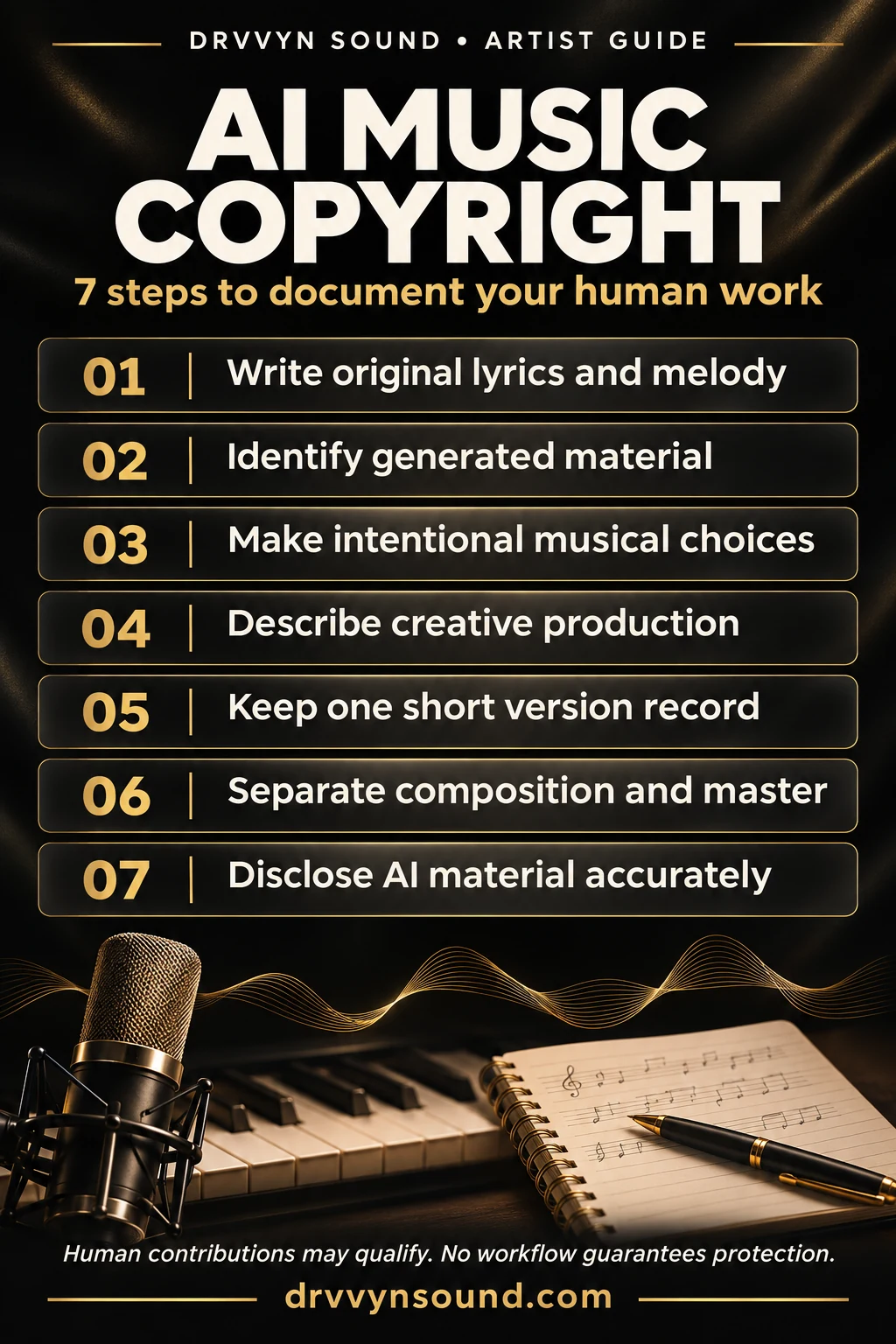
1. Save your lyrics and melody before generating a track
Start with the parts of the song you want to write yourself. Save your lyrics, then record yourself singing or playing the melody. A rough phone recording is enough for this part of the process: you need a record of the tune you composed, not a polished vocal take.
If you give those files to a tool such as Suno, keep the originals. A recording of your melody contains musical expression that a general request like “make a slow R&B song” does not. Listen back to the generated track and note where it follows your melody and where it introduces something different.
Keep the lyric file and melody recording in the same project folder as the song, with a backup elsewhere. A private YouTube upload can be an extra copy if that suits you. It does not replace the files or count as copyright registration.
2. Keep track of what the AI added
You may like the vocal from one generation, a verse from another, and the drums from a third. Keep the source files for the parts you use, and give them names you will recognize when you reopen the session.
A short note can explain the division: which lyrics and melody you supplied, which vocal or instrumental parts came from the system, and which parts you added later. You do not need to document every output you rejected.
Your original sung demo and the generated singer’s performance are different recordings. If the finished track uses the generated voice, describe it that way, even when it sings your lyrics and follows your melody.
3. Build the arrangement in your DAW
Bring the stems into Logic Pro or your preferred digital audio workstation. Listen for what the song needs. Perhaps the second verse arrives too soon, the chorus needs a stronger drum entrance, or the bridge would work better with a new string part.
You can move sections, replace instruments, program MIDI, record ad-libs, or build transitions with kicks, claps, rim knocks, and risers. Choose changes that improve the music. There is no editing quota or percentage of changes that makes a track automatically copyrightable.
Be specific about work done with automatic tools. If a session player creates a string part, keep track of any notes, rhythms, or phrasing you then program or edit yourself. For samples, retain the source and any relevant license information.
Later, “moved the second verse and programmed the drum transition into the chorus” will tell you much more than “heavily edited.” Use that kind of description when it matches the work you did.
4. Describe the production choices that shape the recording
Production matters too. The Copyright Office includes mixing, manipulating, mastering, compiling, and editing sounds among possible forms of sound-recording authorship. Its author guidance explains this alongside performance.
Think about what your decisions do to the song. You might automate the vocal reverb so the verses feel close and the chorus opens up, or change the balance and effects as the arrangement develops. Describe those choices in ordinary musical terms.
Keep routine cleanup in a short separate note. Removing an artifact in RX or checking true peaks in Insight is different from writing a new instrumental passage. A list of plugins will not explain the creative work on its own. And if you process an AI-generated vocal, credit yourself for the production rather than for singing it.
5. Keep a short record for each version
Once the master is finished, take a few minutes to save a record of that version. We recommend including:
- The song title, version, and people who worked on it.
- A short paragraph about what you wrote, recorded, arranged, or produced.
- The lyrics for that version, included once.
- One screenshot of the full arrangement.
- The locations of your project file, original melody recording, and final master.
- A brief note identifying the AI-generated material you kept.
The downloadable worksheet gives you a place to put this. Add room for the lyrics or screenshot as needed. Your saved project already holds the detailed work, so there is no need to duplicate it or capture every plugin window.
If you release an intimate cut, duet, or alternate mix, note what changed. A new vocal treatment, different instrumentation, and rewritten lyrics are different kinds of changes. The version name alone will not tell you what you need to know later.
6. Know whether you’re registering the song or the recording
There are two works to consider: the composition, which includes the music and lyrics, and the sound recording, which is a particular recorded performance and production. The Copyright Office explains the difference in Circular 56A.
For example, an acoustic recording and a full-band recording can use the same underlying song. Creating the second recording does not, by itself, mean you wrote a new composition. If you changed the lyrics or music, identify those changes before deciding what to register.
Check what has already been registered and what new work the application should cover. This is especially useful when you release several versions of one song.
7. Explain the AI involvement on the application
Describe the work you created and identify the generated material you are leaving out of the copyright claim. The Office’s AI registration guidance directs applicants to the Standard Application and requires disclosure and exclusion of more-than-minimal AI-generated material.
The guidance points to the “Material Excluded” section and its “Other” field for that exclusion. An optional note to the Office can provide more explanation. Do not list the AI tool as an author.
Your project notes will help you describe the song, but they do not replace the information required on the form. Follow the current application instructions. If you are unsure which application fits your release or how to describe a particular part, ask the Copyright Office before filing.
A few common questions
Does a paid AI subscription give you copyright?
A tool may give you permission to release its output commercially. That is a question about its terms of use. Copyright protection is a separate question about the work and its human authorship. Check the terms that applied when you generated the material.
Do you need to use Suno or Logic Pro?
No. The same approach to saving and describing your work can be used with other tools. Use software that lets you make the music you want and keep the files you will need later.
Is the song record a required copyright document?
No. It is a way to organize your own work so you can find it and explain it. The Copyright Office application has its own requirements.
Keep the guide with your project files
Download the guide and worksheet when you start your next song. Save the original writing, keep the source audio, and make a short note when the version is finished. That gives you something concrete to refer to when you are ready to register.
For the latest official guidance, visit the Copyright Office’s AI information page.