

Music Business
YouTube Content ID Claims: 30 Day Disputes, 7 Day Appeals
Check claims in YouTube Studio, clear common matches, and prevent new ones through licensing. Learn what the 30 day dispute and 7 day appeal timelines mean.
By DRVVYN · · 9 min read
A Content ID claim means YouTube’s automated system matched part of your upload to a copyright owner’s reference file. Most of the time your video gets monetized, blocked, or tracked rather than hit with a channel strike. Start in YouTube Studio, read the claim details, then pick a fix before the claimant’s response window closes.
TL;DR:
- Check each claim in YouTube Studio for the matched segment, claimant, and regional policy; one video can have several claims, each handled separately.
- Trim, mute, or replace the matched material in Studio before disputing; edits stay on the existing video, preserving its URL, views, and comments.
- YouTube says claimants have 30 days to answer disputes and 7 days to answer appeals; missed deadlines release the claim automatically.
- Keep dated licenses, confirm master and publishing rights, and obtain synchronization clearance for music paired with video; fair use depends on each case’s facts.
What Content ID is and why claims appear
Content ID is YouTube’s matching system. Copyright owners submit audio and visual files, and every new upload is compared against that database. When the system hears or sees a match, it creates a claim without a human ever watching your video.
The matches that surprise creators most tend to be small:
- A song playing faintly in the background of a vlog
- A short excerpt used as a transition or intro
- A sample buried inside a beat you bought or downloaded
- Reused footage, clips, or visuals from a film, show, or another channel
This is different from a manual takedown request or a copyright strike. Those come from a person filing a legal complaint. A Content ID claim comes from a machine matching files, and it carries a softer consequence by default.
Content ID is built for owners who hold exclusive rights, so you will mostly see claims from record labels, film studios, and music publishers. Knowing that helps you read a claim for what it is: a rights-management signal, not an accusation aimed at you.
What a Content ID claim can do to your video
Every claim carries a policy chosen by the claimant, and you may encounter these policies:
- Monetize: ads run on your video, and the revenue goes to the claimant instead of you.
- Block: the video is unavailable, either worldwide or in certain countries.
- Track: the video stays up and earns normally, while the owner watches its viewership statistics.
Policies can differ by region, so the same video may be monetized in one country and blocked in another. Check where the restriction applies before you decide how hard to fight it.
Shorts follow tighter rules. A claimed Short can be blocked, and its monetization and Creator Pool outcome differ from long-form videos. If you publish daily Shorts, a claim on one clip can cost you more than the same claim on a longer upload.
A Content ID claim is not a copyright strike. The strike process is a separate legal route with its own consequences, covered in the dispute section below. A claim limits one video, not your channel.
How to check claim details in YouTube Studio
Before you edit, dispute, or panic, find out exactly what was matched and who matched it.
- Open YouTube Studio and select Content from the left menu.
- Find the video with a “Copyright” label in the Restrictions column.
- Click the label, then choose See details.
- Read the claimant name, the policy applied, and the timestamped segments that triggered the match.
- Look at the claimant’s name closely to judge whether it is the rights holder or an agent.
An agent is common. Plenty of large owners hand Content ID management to specialized firms, so the name on your claim may be one you have never heard of. That matters because a third-party agency can move differently than the artist or label behind the song.
You should also get an email and a notice in Studio when a claim appears. Do not wait for them, though. Checking the Content tab each time you publish music-heavy videos catches problems while they are still easy to fix.
Quick fixes that clear many claims without a dispute
Often you do not need to argue at all. YouTube Studio’s editing tools let you resolve a claim in place, with no re-upload:
- Trim the claimed segment so the matched material is cut from the video.
- Replace the claimed audio with a royalty-free track from the YouTube Audio Library.
- Mute the claimed audio segment. This is often the fastest way to clear a claim automatically.
These edits happen on the existing video, so your URL, view count, and comments stay put. After you save, Studio re-checks the video, and the claim usually drops away once the matched material is gone.
Pro Tip:If the claimed song only plays briefly, mute that stretch first. It costs you almost nothing and lets you check whether the claim clears, so you can decide whether a dispute is even worth your time.
How to dispute, escalate, and what the timelines mean
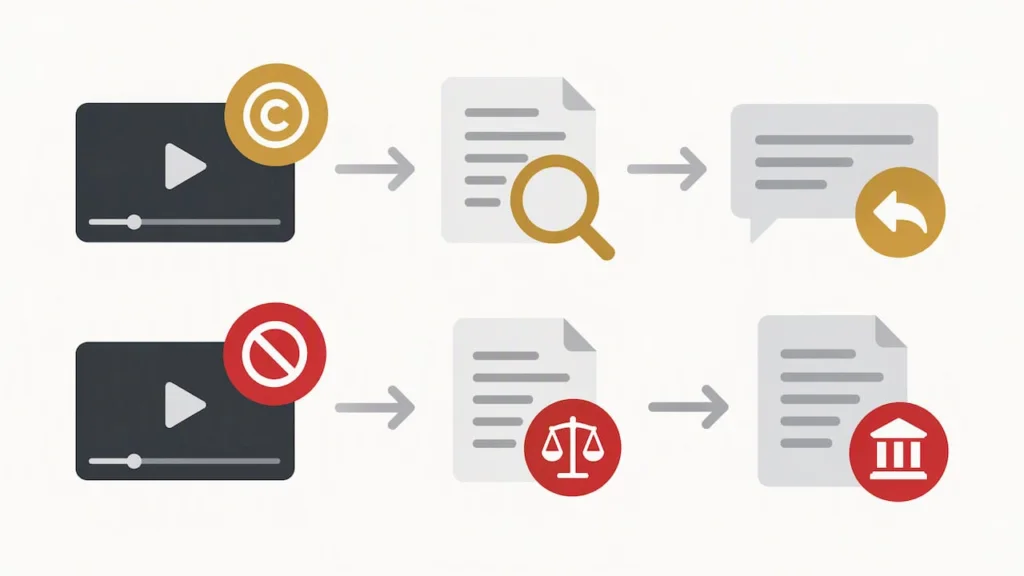
If you believe the claim is wrong, you can contest it from the same details page. Keep in mind that a dispute is a formal request, and the claimant gets time to answer.
- Open the claim in YouTube Studio and choose Select action, then Dispute.
- Pick the reason that fits your case and explain it clearly.
- Submit, and wait for the claimant to review.
- If they reject it, you may appeal that decision.
- To skip the first round, use Escalate to Appeal for faster resolution.
Per YouTube’s own guidance, the claimant has 30 days to respond to a dispute, and 7 days to respond to an appeal. If neither deadline is met, the dispute or appeal expires automatically and the claim is released.
Keep this route separate from takedowns. A dispute challenges a Content ID claim. A counter-notice answers a legal copyright removal request, and that is a different process with legal weight. If your argument rests on fair use, remember it is decided case by case, and the U.S. Copyright Office’s Fair Use Index lists four factors courts weigh rather than any fixed percentage or time limit.
Who can submit Content ID claims, and why agencies matter
Content ID is not open to everyone. It is meant for owners who hold exclusive rights, and that is why most claims come from labels and studios.
Here is what that means for you in practice:
- Many owners outsource the work to service providers, so the claimant name may belong to an agent rather than the artist.
- Dealing with an agency instead of the original creator can complicate disputes and stretch timelines.
- One video can carry several claims at once, each tied to a different segment and a different claimant.
- If you suspect an agency filed the claim, confirm the claimant details in Studio and use the contact channels provided there before escalating.
Each claim on the same video is handled on its own. Clearing one does not clear the rest, so check the full list before you assume you are finished.
Rights checks that keep claims from happening
The best claim is the one that never fires. A short routine before you hit publish does more than any dispute can.
- Confirm you hold both the master rights and the publishing rights for any music you use. Keep license documents and split sheets where you can find them.
- Use original audio, or samples and stems that are properly cleared. When your use is a sync, such as music set to picture, look for explicit synchronization clearance.
- Record permissions and metadata so you can show authorized use if a claim lands. Our guide to the needle drop license walks through which rights each type of use needs.
- Treat fair use as a defense you might raise, not a plan. It depends on the facts of each case.
Pro Tip:Save a dated copy of every license email or agreement in the same folder as the project file. When a claim appears months later, you will have your proof in one place.
If you work with partners on drafts and reviews, a workflow like the one in this watermarked review guide helps keep unlicensed material from slipping into a public upload.
A publisher’s view: clear rights make claims boring
From where we sit, Content ID trouble usually traces back to unclear rights, not to bad intent. A creator grabs a track that sounds right, nobody checks who owns what, and the system does exactly what it was built to do.
We think licensing works best when the paperwork is plain. A license that names the track, the owner, and the permitted use gives everyone the same facts, which means fewer ambiguous matches and quicker resolution when one still appears. For creators, choosing licensed originals is the most practical path away from claims that come from unlicensed or uncleared music. It turns a stressful afterthought into a step you finish before you upload.
If you want to read more about how rights and platforms fit together, our piece on how YouTube Music supports artist discovery is a good next stop.
— DRVVYN Sound
Licensing that keeps your uploads clear
If music is the thing triggering your claims, we can take that variable off the table. We license original tracks so you know what you own the right to use before you publish.
Here is what you get when you work with us:
- Licensing for original music
- Information about the music and its licensing
- Music for your videos
- Information about licensing our music
Instead of piecing together permissions track by track, you start from music that is already cleared and documented. Take a look at our licensing page and tell us what your next video needs.
This article is general information, not a substitute for advice from a qualified lawyer. Consult a qualified legal professional about your own circumstances before acting on anything here.
FAQ
What happens if you get a Content ID claim on YouTube?
Your video stays up in most cases, but the claimant’s policy decides what changes: ads may run for their benefit, the video may be blocked in some regions, or it may simply be tracked. A claim is not a channel strike. Open the details in YouTube Studio to see which policy applies.
How can you avoid a Content ID claim on YouTube?
Use music you have the rights to, and keep proof of that permission. Original audio, cleared samples, and tracks with clear sync licenses are your safest options. Checking rights before you upload is far easier than fixing a claim afterward.
What is a Content ID claim?
It is an automated match between your upload and a reference file a copyright owner has submitted to YouTube. The match can cover music, footage, or other material. The owner then chooses whether to monetize, block, or track your video.
How long do claimants have to respond to a dispute?
Claimant response times for disputes and appeals can differ. Check YouTube’s guidance for details, and review the claim status in YouTube Studio.