

Creative Process
StudioBinder vs Celtx: From Script to Shoot, When to Hire a Partner
Compare StudioBinder and Celtx for script drafting, scheduling, and call sheets, then see when a production partner can do more than another tool.
By DRVVYN · · 6 min read

If you’re drafting a script and nothing else, Celtx gives you a writer-focused home for less money. If you’re already moving toward call sheets, scheduling, and a full crew, StudioBinder carries you further without switching platforms. The right pick depends on whether your project is still just words on a page or progressing toward production.
TL;DR:
- StudioBinder’s free plan limits projects and screenplay documents to one each and caps the calendar; its $99 monthly Professional tier adds four users and advanced scheduling.
- Celtx offers a free trial, then its Writer plan costs $14.99 per month; screenplay exports support moving production planning elsewhere later.
- StudioBinder’s mobile access suits crews checking call sheets, schedules, and assignments, while Celtx supports script reading and light editing more than shoot day management.
- Neither platform tracks music licensing, rights clearances, or cue sheets, so productions with original scoring or licensed tracks need separate coordination beyond the apps.
- Both platforms export scripts, but call sheets, stripboards, and scheduling data may not transfer faithfully, so crews should preserve production records before switching.
What StudioBinder and Celtx Actually Do
StudioBinder is a production management platform built for the whole pipeline: script, schedule, call sheets, and crew coordination in one workspace. It suits production teams and creators who need scheduling and call sheets to live next to their script rather than in a separate tool, according to StudioBinder’s own onboarding guide.
Celtx leans the other way. It started as a scriptwriting tool and still reads that way: clean formatting, easy document organization, and enough production prep to sketch a shoot without overwhelming a solo writer or small team.
Reviewer sentiment splits along the same line. On G2’s comparison page, Celtx holds the higher aggregate score, while StudioBinder’s reviewers tend to point toward its production depth rather than its writing experience.
Standout features worth knowing before you commit:
- StudioBinder: native stripboard and call sheet generation, production calendar, and crew task assignment built around real shoot days.
- Celtx: a writer-first script editor, straightforward project organization, and production prep features for teams that aren’t running a full crew.
- Both: cloud-based collaboration and document storage that keep a script and its revisions in one place.
Neither tool erases the gap entirely. StudioBinder’s free plan limits you to a single project and one screenplay, and Celtx’s deeper production tools sit behind its paid tiers too.
Does Either Tool Connect to Your Music and Visual Production Workflow
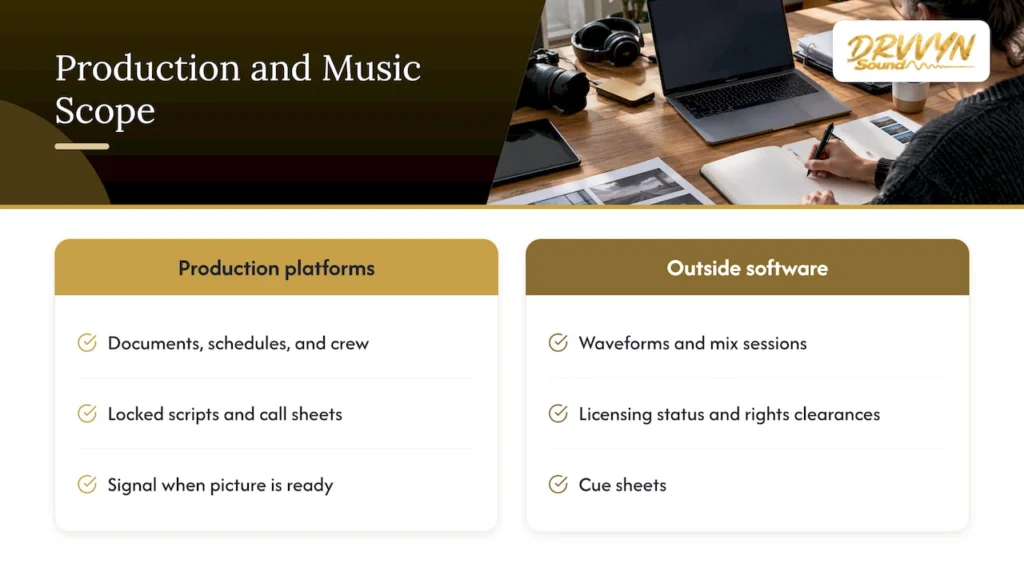
Neither StudioBinder nor Celtx functions as a music or audio production suite, and that’s by design: they manage documents, schedules, and crew, not waveforms or mix sessions. What they do well is keep the paperwork a composer or sound team needs close at hand: a locked script, a shooting schedule, and call sheets that tell a scoring session when picture will actually be ready.
For composers working frame-accurate to picture, the handoff matters more than any built-in integration. A frame-perfect score-to-picture workflow depends on knowing exactly when a cut locks, which is a scheduling question these platforms can answer even without a direct audio plugin.
If your project involves original music or licensed tracks, neither tool tracks licensing status, rights clearances, or cue sheets. That coordination still happens outside the software, through whoever manages your music supervision.
Can You Run Call Sheets and Scripts from Your Phone
Both platforms offer mobile access, though the experience favors different moments in your workflow. StudioBinder’s mobile functionality centers on what a crew needs on set: viewing call sheets, checking the schedule, and confirming crew assignments without pulling out a laptop between setups.

Celtx’s mobile experience leans toward reading and light editing of scripts and documents, which fits a writer reviewing pages on a commute more than a crew lead running a shoot day.
Neither app replaces the desktop experience for heavy lifting, building a stripboard, drafting a full script, or restructuring a schedule still works better on a larger screen. Treat mobile access on both as a companion for checking status, not your primary workspace.
How Do You Move Scripts and Schedules Between Tools
Export and import options shape how easily you can switch platforms midproject or hand files to a collaborator who uses something else. StudioBinder supports standard screenplay export formats and lets you move shooting schedules and call sheets out as shareable documents, which matters once a script leaves the writing phase and needs to reach a crew that isn’t logged into your account.
Celtx covers script export in common industry formats as well, which keeps a document portable if you later move production planning into a dedicated platform like StudioBinder.
Neither platform locks your script in permanently, but the practical limit sits on the production side: call sheets, stripboards, and scheduling data are harder to reproduce faithfully outside the platform that built them. If you’re tracking deadlines across departments, a structured system for production deadline tracking helps keep exported files from becoming orphaned the moment they leave the app.
Where Software Ends and a Production Partner Begins
Script software earns its keep when you’re drafting alone or running a small shoot where you’re also the scheduler. Once a project adds original scoring, licensed music, or coordination across departments, the limits of any single app show up fast: a call sheet only works if the people reading it already know what music clears and when. We’ve watched that gap slow down otherwise solid productions, and it’s usually a sign to bring in a partner rather than add another tool.
A music project management approach that treats scoring and licensing as part of the schedule, not an afterthought, tends to protect your timeline better than any single feature inside either platform.
— DRVVYN Sound
When Hiring a Licensing and Production Partner Makes Sense
Software handles your script and your schedule. It doesn’t clear a track, score a scene, or manage the handoff between your production calendar and your music timeline. That’s where we come in. Licensing, visual media production, and music project coordination services are available for creators whose projects have outgrown a single app.
Consider hiring a partner instead of stitching tools together when:
- Your deadline is tight and you need original scoring or cleared music without chasing separate vendors.
- Your production spans departments, visual, audio, and release, and nobody owns the full timeline.
- You’d rather hand off licensing questions than research them mid-shoot.
Our licensing services cover exactly that gap, and our music project management guide walks through what full coordination looks like once your project is ready for it.
FAQ
Is StudioBinder completely free?
No. StudioBinder’s free plan limits you to one project, one screenplay document, and a capped production calendar, according to StudioBinder’s support documentation. Its paid tiers, including a Professional plan at $99 per month with four complimentary users, unlock unlimited projects and advanced scheduling, per StudioBinder’s plan details.
What is the best software for writing movie scripts?
The right script tool depends on whether you need production features alongside writing. Celtx is built primarily for drafting and organizing scripts, while StudioBinder adds scheduling and call sheets once your script moves toward production, per the G2 comparison.
Is there a free Celtx trial?
Celtx offers a free trial rather than a permanent free tier, with its entry-level Writer plan priced at $14.99 per month after that, according to G2’s listing. That makes it a lower-cost entry point than StudioBinder’s paid tiers for writers who don’t need production tools yet.
Is StudioBinder worth using for small productions?
StudioBinder suits small productions once you need call sheets, stripboards, or crew scheduling in the same place as your script. Reviewers on G2 rate it lower in aggregate than Celtx overall, but its production features remain its clearest advantage for teams moving past the writing stage, per the G2 comparison.