

Creative Process
9-Section Creative Brief Template Proven for Music & Visual Teams
Copy-ready 9-section creative brief template for music and visual teams. Includes three filled examples plus DRVVYN Sound's practitioner notes and a 45–60…
By DRVVYN · · 13 min read

The fastest way to align a creative team is a one-to-two page brief built around nine fields: project purpose, target audience, key insight, desired response, single-minded proposition, mandatories, deliverables and specs, tone and references, and approval flow with deadlines. Copy the creative brief template structure below, fill it in one sitting, and get sign-off before anyone opens a design file or a session.
TL;DR:
- A concise creative brief should be limited to one to two pages to ensure clarity and strategic focus.
- The target audience must be described as a specific person, not a demographic segment, to guide precise creative direction.
- The single-minded proposition is essential, serving as the core idea that keeps the project aligned and reduces rework.
- Including detailed deliverables, specs, and mandatories upfront prevents costly revisions and late-stage scope disputes.
- Clear approval deadlines and sign-off responsibility streamline workflows, preventing delays and ensuring consistent brand application.
What a Creative Brief Actually Is
A creative brief is a short internal document that turns a business goal into a single, focused creative direction. It doesn’t repeat the marketing plan. It answers one question: what should this piece of work make someone feel or do?
That distinction trips people up constantly. A marketing brief lays out business context, things like budget, market conditions, and competitive positioning, while the creative brief translates that context into an inspiring, single-minded proposition a director, designer, or songwriter can actually use. Think of the marketing brief as the “why” and the creative brief as the “what to make.”
You write or request a creative brief at project initiation, before anyone touches a concept. Waiting until after the first draft to define direction is how projects end up in five rounds of “make it pop.”
A tight brief typically covers:
- The business problem, stated in one sentence
- Who the work needs to reach and what they currently believe
- What you want that person to feel, think, or do differently
- The non-negotiables (legal, brand, format) everyone has to hit
- Who signs off, and by when
Why a Tight Brief Cuts Revisions and Protects the Brand
Teams that brief well finish faster, not because the work is smaller, but because fewer decisions get made mid-project. A brief acts as a signed contract for creative judgment. When a stakeholder pushes back on a design choice in round three, you point to the brief instead of re-litigating strategy from scratch.
Quick fact: A creative brief should run one to two pages, maximum. That page limit isn’t a formatting preference. It’s a forcing function. You cannot fit vague goals, three “primary” objectives, and a laundry list of hopes onto two pages. Something has to get cut, and the act of cutting is where the real strategic thinking happens.
Length discipline also protects brand consistency across a team. When five people write briefs the long way, each one emphasizes different priorities, and campaigns start looking like they came from five different companies. A short, consistent format keeps voice and visual direction aligned even as the people writing briefs change month to month.
Skip the brief, or write a sprawling ten-page one nobody reads past page two, and you get the opposite: more revision rounds, looser brand consistency, and stakeholders discovering their real priorities during feedback instead of before kickoff.
The Canonical 9-Section Creative Brief Template
Here is the field-by-field structure. Write one to three sentences per field. If you can’t fill a field in under a minute, the input isn’t ready yet, and that’s worth knowing before the brief goes out.
-
Project & purpose. One sentence on the business problem and why this project exists now. Example: “Streaming numbers for the new single have plateaued after week two; we need a visualizer that extends listening time on YouTube and TikTok.”
-
Target audience. Describe one archetypal person, not a demographic bucket. Name their role, their context, and what’s stopping them from engaging. Example: “A 24-year-old who discovers songs through TikTok sounds but rarely clicks through to the full track because the preview doesn’t signal what the song is actually about.”
-
Key insight. The single truth about that person that unlocks the creative idea. Example: “She associates the song’s mood with a memory, not a genre, so the visual needs to cue emotion before it cues style.”
-
Desired response. A behavior, stated plainly. Not “raise awareness.” Something you can measure. Example: “Increase full-track click-throughs from the 15-second preview by giving the first frame a clear emotional hook.”
-
Single-minded proposition. The one idea the work has to communicate, in a sentence. This is the section most briefs skip, and it’s the one that saves the most rework.
-
Mandatories. Every non-negotiable in one place: legal disclaimers, logo usage, aspect ratios, brand colors, content restrictions.
-
Deliverables & specs. Exact file types, dimensions, durations, and quantities. Example: “One 60-second vertical visualizer, MP4, 1080×1920, plus three 15-second cutdowns for Reels and TikTok.”
-
Tone & references. Three to five reference pieces (real links or examples), plus two or three adjectives that describe the feeling, not the aesthetic buzzwords.
-
Approval flow & deadlines. Who reviews at each stage, in what order, and the exact date each round is due.
If the inputs already exist, filling this template takes 45 to 60 minutes in one working session, ideally with the person who owns the budget in the room.
Three Filled Examples and Where to Find Editable Templates
Seeing the format filled out for different project types makes the template click faster than reading definitions.
Campaign brief (marketing campaign). Purpose: drive pre-save conversions for a single launch. Audience: a listener who follows the artist casually on Instagram but has never pre-saved anything. Proposition: “This song is the soundtrack to the moment you finally let something go.” Deliverables: three static posts, one countdown reel, one email. Approval: marketing lead reviews Monday, artist signs off Wednesday, live Friday.
Video production brief (music video). Purpose: visualize the song’s emotional arc for streaming platforms. Audience: existing fans who stream the track but haven’t watched a video yet. Proposition: “Grief looks quiet from the outside and loud on the inside.” Mandatories: no visible brand logos except end-card, 16:9 master plus 9:16 cutdown. Approval: director’s cut reviewed internally, then by the artist, then final sign-off 48 hours before release.
Website/homepage brief. Purpose: convert playlist visitors into email subscribers. Audience: someone who found the artist through a curated playlist and has 90 seconds of attention. Proposition: “One click gets you the next song before anyone else hears it.” Deliverables: hero section, email capture form, mobile-first layout. Approval: designer draft, one internal round, final stakeholder sign-off.
For building and sharing your own version, Canva offers visual, drag-and-drop layouts that work well for stakeholders who think in mood boards rather than documents. HubSpot folds brief templates into broader campaign planning if you’re already tracking assets there. Adobe for Business suits teams working inside Creative Cloud who want the brief living next to the actual files. Miro works best for collaborative, whiteboard-style briefing sessions with multiple stakeholders contributing live.
Best Practices and the Mistakes That Cause the Most Rework
A few habits separate briefs that work from briefs that generate three rounds of confused feedback.
- One objective, not three. A brief listing “increase awareness, drive conversions, and build loyalty” gives creatives no way to prioritize when those goals conflict, which they always eventually do.
- Write the audience as a person, not a segment. “Women 25 to 34” tells a designer nothing. “Someone scrolling at midnight who needs a reason to stay awake for one more episode” tells them everything.
- Keep every mandatory in one section, with one owner. Scattering legal notes across three fields guarantees someone misses one during production.
- Never use an adjective without a reference. “Make it feel premium” means five different things to five different people. Three to five reference links pin the feeling down to something concrete.
- Update the brief after the first creative review, not after the third. Guides on brief structure consistently point out that the first review round is when the brief should get revised if direction shifts, and that a single named owner should hold version control from that point forward.
Pro Tip:Print the single-minded proposition line in bold at the top of every internal review document. When feedback drifts off-strategy, that one sentence gives you a fast, neutral way to redirect the conversation without making it personal.
Who Writes It, Who Approves It, and How It Enters Your Workflow
In most setups, the strategist or account lead drafts the brief, and stakeholders supply the raw inputs, business goals, brand mandatories, budget ceilings, rather than writing the document themselves. That division matters. Stakeholders are good at knowing what they need; they’re rarely good at compressing it into a single-minded proposition.
A workable approval flow looks like this:
- Strategist drafts the brief from stakeholder input, targeting a same-day or next-day turnaround.
- Internal creative lead reviews for gaps within 24 hours; this catches missing mandatories before they reach the client or department head.
- Primary stakeholder signs off with a hard deadline attached, not an open-ended “let me know.”
- Final brief gets attached directly inside the project management tool, Asana, Monday, or a pinned Slack message, so the creative team references the live version instead of an email attachment from three weeks ago.
Mapping exact reviewers and turnaround windows to each round, rather than leaving review “open,” is one of the most reliable ways to keep approval flow from becoming the actual bottleneck in a project. A brief with no deadline attached to sign-off is really just a suggestion.
How DRVVYN Sound Applies the Brief to Music and Visual Work
Music and visual projects carry mandatories that a standard marketing brief template doesn’t anticipate: audio stem requirements, caption file formats, licensing notes, and exact delivery codecs. Leaving those out of the brief is how a finished visualizer ends up needing a full remaster because nobody specified mastering levels upfront.
A filled example for a music visualizer might include:
- Deliverables: 4K master file, H.264 codec, stems delivered separately for platform remixing
- Caption file in SRT format for accessibility on YouTube
- Licensing note confirming sync rights before any brand partnership placement
- Approval checkpoints: rough cut review, color and audio mix review, final master sign-off
Building out ideas for the visual side gets easier with a running list of music visualizer concepts to draw from during the tone and references field. The practical rule holds regardless of project size: put rights, stems, and mastering specs into the brief on day one, because fixing them after final delivery costs far more time than writing three extra sentences up front.
Getting Real Stakeholder Input Without Endless Meetings
The brief is only as good as what goes into it, and most stakeholders don’t know how to hand over useful input unannounced. Ask open questions and you’ll get vague answers like “make it feel fresh.” Ask targeted questions and you’ll get something you can actually write down.
Send a short set of questions before the briefing meeting, not during it: What’s the one thing this project needs to accomplish? Who exactly is this for, described as a person? What’s happened before that we should avoid repeating? What can’t change no matter what? Getting answers in writing beforehand means the meeting becomes a working session to draft the brief together, rather than a fishing expedition for basic facts.
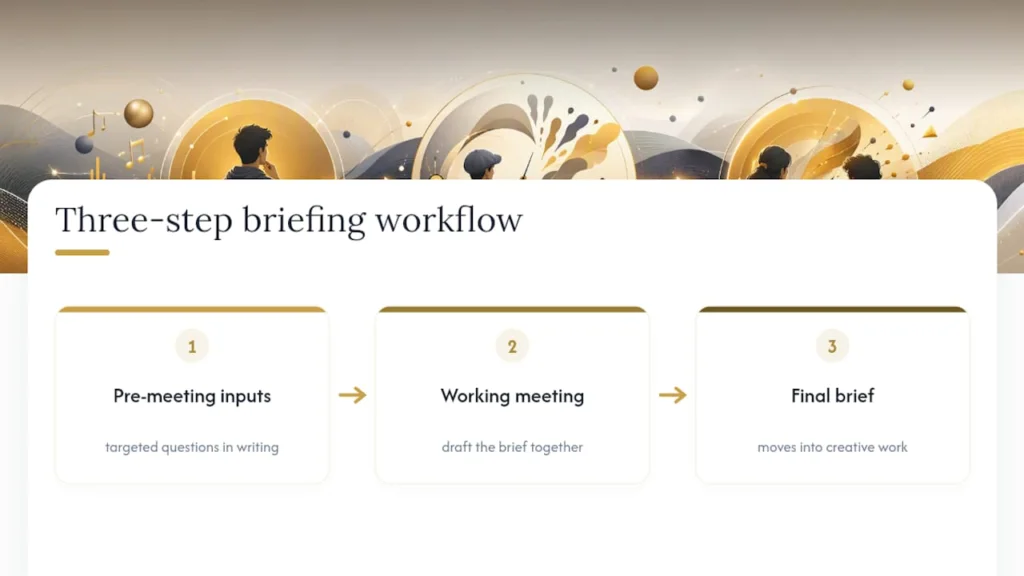
When multiple stakeholders have competing priorities, and they usually do, resolve that tension before the brief goes out, not during creative review. If marketing wants brand awareness and sales wants conversions, someone with authority has to pick the primary objective. Burying that conflict inside a brief that tries to serve both audiences guarantees confused feedback later.
Typeform-style guided forms handle this well for larger teams: a structured, question-by-question format can get a short brief completed in 10 to 15 minutes and pushes responses straight into a shared document, which cuts down on the back-and-forth email chains that usually eat up a week before a project even starts. For live or event-based creative work, a production timeline checklist is a useful companion for capturing deliverable deadlines that a standard brief template doesn’t fully account for.
Document every input source in the brief itself, a line noting who supplied what, so disagreements later have a clear paper trail back to the original ask.
Customizing the Template Across Project Types and Industries
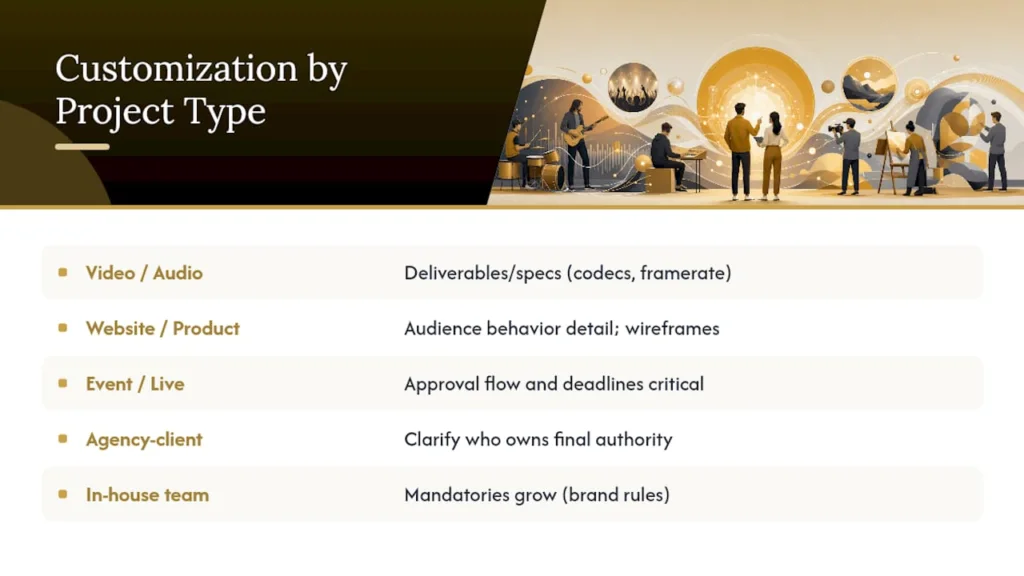
The nine sections stay fixed. What changes is how much weight each section carries depending on the work.
For a video or audio project, the deliverables and specs section expands considerably, codecs, frame rates, aspect ratios, file naming conventions, while the single-minded proposition often stays short and emotional. For a website or product brief, deliverables might include wireframes and page counts, but the target audience section needs more behavioral detail: what’s the visitor doing right before they land on this page?
For event or live campaign work, approval flow and deadlines matter more than almost any other field, because live dates don’t move the way a digital launch date can. Reference material from a production management guide is useful here for mapping dependencies between creative sign-off and physical logistics.
For agency-to-client work, add a line clarifying who owns final creative authority; ambiguity there is one of the most common sources of late-stage scope disputes. For in-house team briefs, that line often isn’t necessary since ownership is already clear internally, but the mandatories section tends to grow instead, covering brand guidelines that outside agencies would already know but internal teams sometimes forget to write down.
The customization principle is simple: keep the skeleton, adjust the muscle. Don’t add new sections. Add depth to the sections your specific project type actually stresses.
Tools and Software Worth Using for Briefing
Choice of tool depends less on features and more on how your team already works. A brief that lives somewhere nobody checks is worse than no brief at all.
Teams that think visually tend to gravitate toward Miro or Canva, both good for collaborative sessions where stakeholders sketch and annotate live rather than writing prose. Teams already inside a marketing stack often keep briefs in HubSpot so they sit next to campaign performance data. Production-heavy teams working in Creative Cloud benefit from keeping the brief in Adobe for Business, close to the actual files it’s guiding.
For structured intake at scale, Typeform turns the brief into a guided form that pushes answers directly into shared documents. For a fillable, no-frills starting point, the AMA (American Marketing Association) creative brief template collects strategic context, audience insight, and approval flow in a format that doesn’t require any particular software to use. Whatever you pick, attach the final brief inside your actual project management tool, not a separate drive folder, so the creative team can’t claim they never saw the latest version. A storyboard tool pairs well alongside the brief once references and tone are locked, giving visual projects a second layer of shared direction before production starts.
DRVVYN Sound’s Perspective: What the Brief Actually Buys You
We treat the brief as the moment strategy either survives contact with production or doesn’t. A visualizer project scoped with a filled nine-section brief went to final sign-off in two review rounds instead of the usual four, mostly because mastering and licensing mandatories were locked before anyone touched a color grade.
Sources
- Revive your content with these creative brief examples
- Marketing brief vs creative brief — differences and examples
- Monday
- AMA creative brief template
FAQ
What Is the Format of a Creative Brief?
A creative brief is typically a one-to-two page document organized into short fields rather than long paragraphs, covering purpose, audience, key insight, proposition, mandatories, deliverables, tone, and approval flow.
What Are the 9 Sections of a Creative Brief?
The nine sections are project and purpose, target audience, key insight, desired response, single-minded proposition, mandatories, deliverables and specs, tone and references, and approval flow with deadlines.
How Do You Structure a Brief?
Start with the business problem in one sentence, define the audience as a specific person, state one measurable desired response, and end with mandatories, deliverables, and a named approval flow with deadlines attached.
What Is a Brief Example?
A filled example might read: purpose is boosting pre-save conversions for a single launch, audience is a casual Instagram follower who has never pre-saved a track, and the proposition is a one-line emotional hook tied to the song’s theme.