

Music Business
Three Cue Sheet Meanings for Composers: Protect Your Royalties
Learn the three meanings of a cue sheet, from .cue files and PRO reports to live run sheets, and use composer best practices to protect your royalties.
By DRVVYN · · 9 min read
A “cue sheet” means three different things, and confusing them costs people time and money. It’s a plain-text .cue file that maps tracks on an audio disc or single-file rip. It’s also the document composers and production companies file with PROs like ASCAP and BMI so royalties reach the right person. And in live theater or broadcast, it’s the show-running document that tells an operator when to trigger a sound, light, or video cue. Below, pick the section that matches what brought you here.
TL;DR:
- Confirm which type of cue sheet you need: computing, film/TV royalty, or live stage, to avoid creating the wrong document.
- Ensure the .cue file accurately references file names and track timing before archiving or burning, as errors silently break playback.
- Provide complete ownership, usage, and timing details in your film/TV cue sheet, since missing info can result in lost royalties for composers.
- Use clear, concise layouts for live cue sheets, favoring action and trigger descriptions over absolute timings to ensure quick readability during performances.
- Always keep copies of your cue sheets and verify submissions with production companies or PROs to prevent missed royalty payments.
What Is a Cue Sheet? Three Types, One Confusing Name
The confusion around this term isn’t your fault. The phrase “cue sheet” gets applied to three unrelated documents, and mixing them up wastes real time.
- Computing (.cue file): a text file that tells your player or burner where tracks start and stop inside a single audio image. Ripping hobbyists and archivists use this.
- Film/TV cue sheet: the paperwork a production company files with a performing rights organization so composers and publishers get paid for music used in a show or movie. Composers, music supervisors, and production coordinators live in this world.
- Live/stage cue sheet: the run sheet a stage manager or AV operator follows during a live show, listing when each light, sound, or video cue fires. Theater techs and event AV crews depend on this one.
Here’s where people trip up: practitioners in production circles regularly stress that confirming which meaning applies before you start saves you from building the wrong document entirely. There’s also a related but distinct term worth knowing. A cue sheet is not a split sheet. A split sheet records who owns what percentage of a song; a cue sheet records how and where that song was used. More on that distinction below.
What Fields Belong in a .Cue File?
A .cue file is a plain-text index. It doesn’t hold audio, it just tells software where one track ends and the next begins inside a larger file or disc image, using commands like FILE, TRACK, and INDEX with timing written in minutes, seconds, and frames (MM:SS:FF).
Here’s what a small real-world snippet looks like:
FILE "album.wav" WAVE
  TRACK 01 AUDIO
    TITLE "Opening"
    PERFORMER "DRVVYN"
    INDEX 00 00:00:00
    INDEX 01 00:00:02
  TRACK 02 AUDIO
    TITLE "Second Track"
    PERFORMER "DRVVYN"
    INDEX 01 03:45:12
INDEX 01 marks where a track officially starts; INDEX 00 marks a pre-gap, the silent buffer before it. REM lines hold comments or extra metadata. More advanced sheets add ISRC for the track’s international recording code, CATALOG for the disc’s UPC, and PREGAP/POSTGAP commands for hidden or bonus tracks.
| Field | What it does |
|---|---|
| FILE | Names the audio file and its format (WAVE, MP3, etc.) |
| TRACK | Starts a new track entry with a number and type |
| INDEX 01 | Marks the audible start of the track |
| INDEX 00 | Marks the pre-gap before the track begins |
| REM | Holds comments or nonstandard metadata |
| ISRC | Stores the track’s international recording code |
The standard workflow: rip a disc with a tool like Exact Audio Copy, which generates a matching .cue alongside the image file. Open both in foobar2000 to play the album with correct track breaks, or load them into a burning tool like ImgBurn to recreate a physical disc. The catch is that some rippers write extended REM fields that other players quietly ignore, so a .cue that looks perfect in one app can play back with missing metadata in another. Lose the .cue file entirely and your audio survives, but the track map and any hidden-track boundaries become a manual re-indexing job.
Pro Tip:Before you burn or archive a rip long-term, open the .cue file in a plain text editor once and confirm the INDEX and FILE lines point to the actual file name on disk. Renamed files break the reference silently.
What Does a Film or TV Cue Sheet Need to Include?
A film or TV cue sheet is the financial record that gets a composer paid. It has to include the program or episode title, air date, cue title, composer name, publisher, PRO affiliation, usage type, exact duration, and ownership splits for every party involved. Miss a field, and a performing rights organization can’t allocate the royalty correctly, even if the music aired flawlessly.
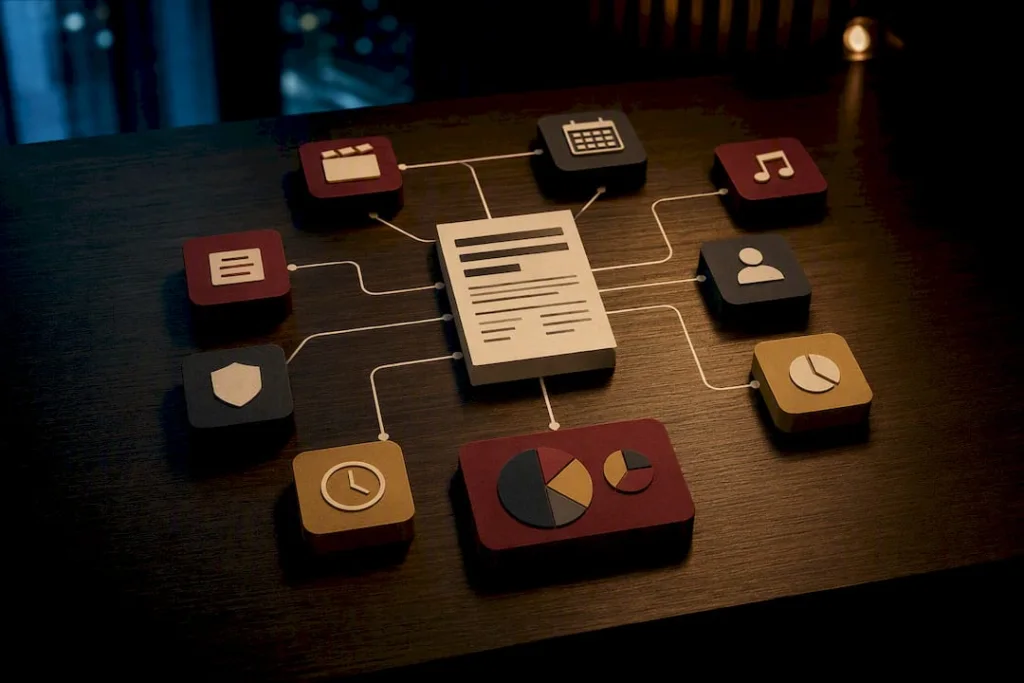
BMI describes the cue sheet as the vehicle that lets it match a specific piece of music to a specific broadcast and pay out based on exactly how that music was used, whether as background score, a visual vocal performance, or a theme. ASCAP takes the same position and generally prefers to receive cue sheets directly from the production company, submitted promptly after the episode or film airs.
This is where cue sheets and split sheets intersect but stay separate. A split sheet establishes who owns what share of the underlying song. The cue sheet then reports how that song was used on screen, and the ownership percentages from the split sheet have to carry over accurately, or a co-writer’s share simply doesn’t show up in the royalty statement.
- Program or episode title, network, and air date
- Cue title and exact duration (usually to the second)
- Composer, publisher, and PRO affiliation for each writer
- Usage type: theme, background score, visual vocal, or source music
- Ownership percentage for every credited party
Here’s the uncomfortable part composers rarely hear until it’s too late: a missing or inaccurate cue sheet is one of the most common reasons a composer receives zero performance royalties for music that clearly aired. Production companies file the official version, but nothing stops you from keeping your own copy and comparing notes. If you’re still deciding which performing rights organization to register with in the first place, comparing ASCAP and BMI directly affects how your cue sheets get processed later.
How Do You Build a Reliable Live Show Cue Sheet?
A live cue sheet works only when the operator running it can read it fast, under stage lighting, mid show. That means a clean layout beats a dense one every time.
- Cue number: sequential, never reused, even across scene breaks.
- Action: what fires (lights up, sound cue plays, video rolls).
- Trigger: the line, sight cue, or timestamp that starts it.
- Timing method: dynamic (“on her exit”) or absolute (a fixed clock time).
- Operator: who owns that cue.
- Notes: anything unusual, like a backup plan if the trigger is missed.
Dynamic triggers, tied to a spoken line or physical action, tend to hold up better than absolute time codes, since live performances rarely run to the second. Stage-production guidance consistently recommends favoring line or sight cues over fixed clock times for exactly this reason. A shared spreadsheet paired with a visible stage timer is the standard setup most touring and theater crews land on, with large type on the trigger column so it reads at a glance.
Pro Tip:Color-code your highest-risk cues (pyro, blackout, hard cutoffs) so an operator’s eye finds them instantly without reading the whole row.
How Do You Create and Submit the Right Cue Sheet?
Start by confirming which of the three types you actually need. That single step prevents most of the wasted effort people run into with this document.
- Verify the type: computing, PRO/royalty, or live production.
- Choose your tool: Exact Audio Copy or foobar2000 for .cue files; ASCAP or BMI’s official templates for PRO submissions; a shared spreadsheet for live shows.
- Populate every mandatory field for that type, not a partial set.
- Validate ownership splits and durations against your split sheet before you submit anything.
- Export or save in the correct format, matching file naming conventions your platform or PRO expects.
- Submit or archive, and request written confirmation that what you sent matches what was filed.
| Cue sheet type | Tool or template | What to double-check |
|---|---|---|
| .cue (computing) | Exact Audio Copy, foobar2000 | File path references, INDEX accuracy |
| Film/TV (PRO) | ASCAP or BMI cue-sheet templates | Ownership splits, duration, PRO affiliation |
| Live/stage | Shared spreadsheet, stage timer | Trigger clarity, operator assignment |
Keep a backup of every version you submit, note the date you sent it, and file confirmation replies in the same folder. If you’re managing multiple releases or productions at once, a structured project management approach keeps these documents from scattering across email threads.
DRVVYN Sound’s Perspective: Protect Your Own Paper Trail
Nobody files a cue sheet incorrectly on purpose. It happens because the paperwork sits low on a production’s priority list, and by the time anyone notices a gap, the royalty statement has already come and gone quiet.
Our stance: never rely solely on someone else’s filing. Keep a signed split sheet and your own archive copy of every cue sheet tied to your music, whether you wrote it or received it from a production company. Record every collaborator’s PRO affiliation and IPI or CAE number up front, before the project wraps, not after someone’s already hard to reach. And always ask the production company to confirm, in writing, that what they submitted to the PRO matches what you have on file. That one email habit catches more missing royalties than any dispute filed after the fact.
— DRVVYN Sound
Sources
Start with BMI’s cue sheet guidance, ASCAP’s Cue Sheet Corner, the .cue file syntax reference on Wikipedia, and Stagetimer’s live cue-sheet breakdown for production-side detail, including advice covered in Slate’s media production resources.
If cinematic, licensable music is part of what brought you to this topic, DRVVYN Sound’s catalog is built with exactly this kind of usage in mind, from sync placements to brand partnerships where clean metadata and clear splits matter from day one.
FAQ
Is a Cue Sheet a Legal Document?
A film or TV cue sheet isn’t a contract, but it’s the operational record PROs use to allocate royalties, so an inaccurate one has real financial consequences. A split sheet, by contrast, is the actual legal record of songwriting ownership.
Is It Cue Sheet or Queue Sheet?
It’s “cue sheet.” The word “cue” refers to a trigger or signal, whether that’s a track start point in a .cue file or an actor’s line prompting a lighting change. “Queue” (a waiting line) is a different word entirely and doesn’t apply here.
How Do You Create a Cue Sheet?
It depends on the type: use Exact Audio Copy or a text editor for .cue files, ASCAP’s or BMI’s official templates for film/TV royalty reporting, or a shared spreadsheet with a stage timer for live productions.
What Is a Cue Sheet in Radio?
In radio and broadcast contexts, a cue sheet functions like the film/TV version: a log of what music aired, when, and who owns it, submitted to a PRO so composers and publishers get paid for the airplay.