

Artist Strategy
Discord for Musicians: Three Links to Start Collaborating
Find active Discord servers for musicians, build a profile with three work links, share stems, and plan listening sessions without relying on music bots.
By DRVVYN · · 8 min read
The fastest way in is simple: search genre tags on directories like Disboard, follow the social links your favorite artists and labels post, and browse Discord’s own server categories until something active feels right. Join one tonight, then introduce yourself with three sample links to your work. One honest note before you dive in: music playback bots in voice channels are unreliable right now, so plan around them rather than depending on them.
TL;DR:
- Judge servers by recent chat, feedback channels, and events, not membership; skip any whose last 20 messages span more than three days.
- Ask for genre and collaborator roles as soon as you join, because owners configure permissions manually and may restrict feedback or project channels.
- Name shared stems consistently, such as MySong_Drums_Stem_v01.wav, and add a brief change log so collaborators can identify each file and version.
- For group listening, share a streaming link for synchronized playback or use Discord screen share; bots can disconnect when voice libraries or streaming access change.
- Use an age restriction for mature material, as Discord requires; the minimum account age is 13 in most countries and 16 in some.
Where to Discover Active Music Discord Servers
You don’t need to guess where musicians gather. A handful of discovery routes cover almost everyone.
- Search genre-tagged listings on Disboard, which group servers by style so you can find a rap, pop, or lo-fi community without sifting through unrelated ones.
- Check Discord’s own browse page under the Music category for larger themed hubs with steady traffic.
- Follow artists, labels, and producers you admire on social media. Many link their community server right in their bio.
- Scan music subreddits and production forums, where invite links get shared organically and often come with a sentence or two about what the server actually offers.
Once you find a candidate, look past the member count. A server with 40,000 names and a dead chat teaches you nothing. Instead, open a few channels and check for activity in the last day or two, read the pinned rules, and see whether there’s a dedicated space for feedback or collaboration requests, not just general chat. A clear events calendar or a recent listening party is a strong signal the server is doing real work, not just sitting there.
Pro Tip:Before joining, read the last 20 messages in the general channel. If they’re from more than three days ago, keep looking.
Setting Up Your Profile and Finding Your First Role
How you present yourself in the first five minutes decides whether collaborators take you seriously or scroll past.
- Set an avatar that’s actually you or your brand, and write a short bio noting your genre, your DAW, your role (producer, vocalist, mixing engineer), and your current availability.
- Link your work efficiently: one Linktree or three direct links covering a finished track, a stem or instrumental, and a short reel or clip.
- Request relevant roles as soon as you join, genre tags and a collaborator badge are common, since many servers gate feedback or project channels behind them.
- Post a short intro using a simple template: who you are, what you make, what you’re looking for, and your three links.
Server owners generally have to configure these roles and permissions by hand, since Discord doesn’t set them up automatically for music-specific communities the way it might for a gaming server. Research on Discord’s growth among creator communities notes that this manual setup is part of why some servers feel more organized than others. A tight intro respects that structure instead of fighting it.
Workflows for Sharing Stems and Running Listening Sessions
A good music server organizes itself around a few repeatable habits rather than constant improvisation.
A channel structure that actually works usually includes a #tracks-feedback room for finished or near-finished work, a #stems channel for raw files open to remixing, a #projects space for ongoing collaborations, and a voice channel reserved for live sessions. Keep file names consistent across a project. Something like MySong_Drums_Stem_v01.wav tells collaborators exactly what they’re opening and which version they’re on, and a one-line changelog in the upload message saves everyone from re-downloading the wrong file.
For listening sessions, shorter works better than you’d think.
- Host the event in a voice channel and share a streaming link rather than relying on a bot to play audio live.
- Ask listeners for specific feedback: first impression, strongest section, and one thing they’d change, not a vague “thoughts?”
- Keep sessions to a short duration so energy stays high and technical hiccups don’t eat the whole event.
Pro Tip:Pin a short feedback template in your project channel so every response follows the same format, genre, BPM, what stage the track is at, and what kind of notes you want.
Why Music Bots Keep Breaking and What to Use Instead
If you’ve tried to queue a track with a bot and watched it disconnect mid-song, you’re not alone. Discord’s changes to voice encryption and tightening restrictions from third-party streaming services have broken the libraries many of these bots depend on.
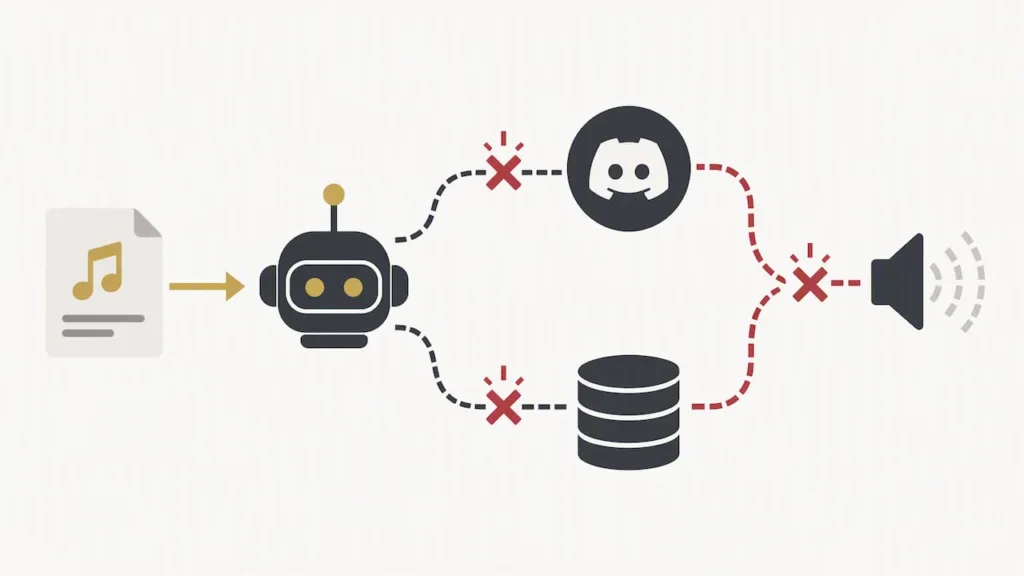
A documented example: the Spoticord bot project reported being offline and attributed the outage to incompatibility with its voice library alongside restricted access to Spotify’s platform, forcing a migration away from its original setup.
In practice, that means you should expect music bots in voice channels to be hit or miss, sometimes working fine for weeks, then disconnecting without warning. Rather than building your event around a bot, lean on more dependable alternatives:
- Share a direct streaming link and let everyone press play on their own end in sync.
- Screen-share audio through Discord’s built-in screen share feature, which doesn’t depend on a third-party bot.
- Host the track on a streaming platform and share timestamps so listeners can jump to specific sections during discussion.
- Upload to shared cloud storage for a true group listen when timing matters less than access.
Rules, Moderation, and Safety That Keep a Server Productive
The best music servers run on a short list of enforced expectations, not a wall of legal text nobody reads.
- Require a feedback template for critique channels so notes stay constructive and specific instead of one-word reactions.
- Ban unsolicited DMs and spam links, and make attribution mandatory when someone builds on another member’s stems.
- Give server owners access to role permissions, slowmode, and automod filters so a single bad actor can’t derail an active channel.
- Mark 18+ content as an age-restricted server when it applies, since Discord requires that designation for mature material.
Age matters structurally, too. Discord requires users to be at least 13 in most countries, with some requiring 16, and it uses age assurance to confirm eligibility before granting access to age-restricted spaces. If you run a server with mature lyrical content or explicit visuals, plan your channel structure around that requirement from day one.
Pro Tip:Pin your rules and your feedback template in the same channel. New members read pinned messages far more often than they read a rules channel they have to click into separately.
How We Use Discord: A Working Checklist
Our process centers on a few habits we repeat every cycle. We run recurring listening sessions tied to new releases, usually short and voice-based, with a streaming link shared ahead of time so playback never depends on a bot. We keep a pinned feedback template in our project channel so notes come back in a usable format, and we post a simple collaboration intake so new collaborators know what information to provide. None of this requires a complicated setup, just consistency, which is what keeps a creative space useful instead of noisy. For more on how fan communities translate into real growth, our piece on how fan communities shape music discovery walks through the mechanics in more depth.
— DRVVYN Sound
FAQ
Did Searchcord shut down?
We don’t have confirmed, current details on Searchcord’s operating status to report here. If you’re trying to find music servers, genre-tagged directories like Disboard and Discord’s own browse page remain reliable starting points regardless of any single tool’s status.
What is the 13 rule on Discord?
Discord requires users to be at least 13 years old to create an account, and some countries set the minimum age at 16. Age assurance may also apply when a server or channel is marked as age-restricted.
What is the best music player app for Discord?
There isn’t one dependable option right now, since many popular bots have broken due to voice library changes and streaming platform restrictions, as seen with the Spoticord outage. A more reliable approach is sharing direct streaming links or using screen share for group listening instead of relying on an in-voice bot.
What is the best Discord server for artists?
The right server depends on your genre and goals, so start with tag searches on directories like Disboard or Discord’s Music category and evaluate each one for recent activity and dedicated feedback channels. A partner resource, UpNComer’s list of active musician communities, is a solid place to find curated examples if you want a shortcut.
Sources
- ENHANCEMENT Spoticord is offline + moving away from librespot · Issue #58 · SpoticordMusic/spoticord
- Discord servers tagged with rap-music
- Research paper (Discord community dynamics) — arXiv
Official Docs and Sources for Bot Status, Age Rules, and Server Discovery
For firsthand verification beyond this guide, Discord’s support articles cover age requirements and age-restricted server guidelines directly. The Spoticord GitHub issue documents the technical constraints behind recent bot outages. For server discovery, Disboard’s genre tags and representative community pages like /adrii show what an active setup looks like in practice.
If you’re ready to turn the connections you make into something releasable, our licensing page outlines how we work with artists and partners on original music and creative projects.