

Creative Process
Music Video Storyboard Built Around the Song With Timecode Templates
Song centered music video storyboard workflow with timecode templates, shot lists, and sync points to help filmmakers deliver synced single day shoots.
By DRVVYN · · 16 min read
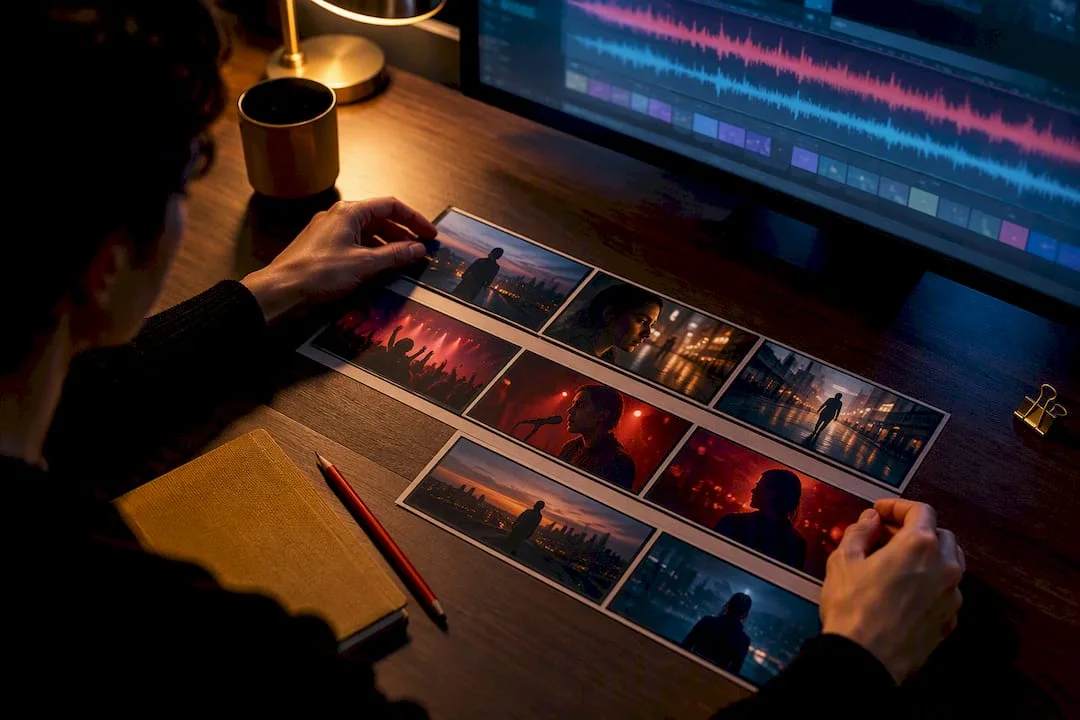
A music video storyboard is a shot-by-shot map anchored to your song’s exact timecodes, and it exists to answer one question before you ever call “action”: what footage do you need to cut cleanly to the music? Skip it, and you find out on set, when a reshoot costs money you don’t have. The first task, before you sketch a single frame, is breaking the song into timecoded sections.
TL;DR:
- Exact timecoded sections of the track are essential to keep sync points accurate and prevent costly reshoots due to guesswork.
- Choosing between narrative, performance, or hybrid depends on the song’s story, budget, and shoot schedule, influencing location and coverage needs.
- Generating two to six shot options per section, marked with camera movement, lens, and coverage type, ensures visual variety and editing flexibility.
- Planning precise sync points and lip-sync coverage in the storyboard reduces editing time and avoids missing key musical cues during shoot.
- Building a detailed setup sheet from the storyboard ensures efficient scheduling, grouping by location, look, and minimizing wardrobe or natural light disruptions.
How Do You Map a Track Into Timecoded Sections?
Open the song in any waveform editor and write down the start and end timecode for every section: intro, verse, pre-chorus, chorus, bridge, drop, outro. This becomes the spine of the whole board. Every visual decision that follows, from where the camera moves to which look the artist wears, hangs off this timeline.
The reason this matters is simple. Without exact timecodes, sync points drift, coverage gets guessed instead of planned, and the editor ends up reconstructing your intentions from memory on the day after the shoot. A track breakdown anchored to real timecodes turns guesswork into a schedule everyone on set can follow.
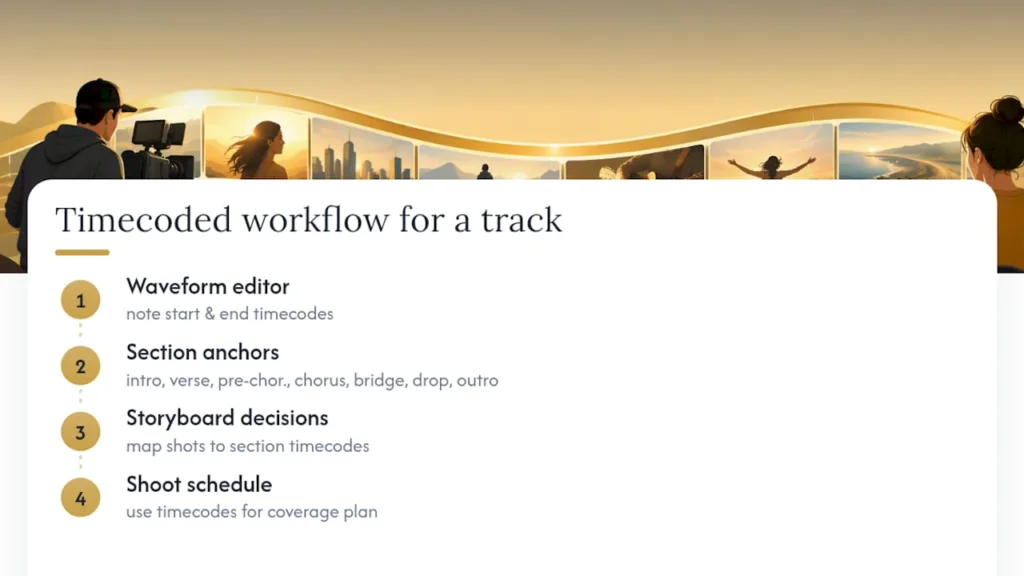
A simple three-minute pop song might break down as follows:
A typical pop song breaks into sections such as intro, verse, pre-chorus, chorus, bridge, and outro, each lasting a portion of the total length, commonly around three minutes in total. Precise timecodes vary per song but planning visuals in alignment with these sections is key.
Once these timecodes exist, everything downstream gets easier to plan.
Which Approach Fits: Narrative, Performance, or Hybrid?
A narrative video tells a story independent of the artist singing directly to camera. A performance video centers the artist, usually lip-syncing in one or more locations. A hybrid blends both, cutting between story beats and performance moments.
Each choice carries real consequences for your shoot day. Narrative demands more locations, more setups, and less lip-sync coverage, but it also means the artist doesn’t need to nail the same take twenty times. Performance demands heavy lip-sync coverage from multiple angles, but keeps your location count low and your schedule tighter. Hybrid needs both, which usually means the longest prep and the most complex setup sheet.
Three quick signals point you toward the right choice:
- If the lyrics tell a clear story arc, lean narrative.
- If the artist’s face and energy are the selling point (or the budget is tight), lean performance.
- If you have one full day, two looks, and one location with strong production value, hybrid usually delivers the most variety per hour on set.
How Do You Generate Shots for Each Song Section?
For every section on your timeline, sketch two to six candidate shots fast. Don’t overthink composition on the first pass. You’re generating options, not finished art.
- Start with the emotional intent of the section. A drop wants energy and movement. A bridge often wants stillness or isolation.
- Draft a wide, a medium, and a close-up variation for that intent, then add one unexpected angle (low, overhead, through an object) if time allows.
- Label each frame with camera movement (static, dolly, handheld, gimbal), a suggested lens (wide 24mm for environment, 50 to 85mm for intimate performance), and coverage type: performance, narrative, or insert.
- Flag which frames are must-haves versus nice-to-haves so the DP knows what to protect if time runs short.
For a chorus with heavy lip-sync, plan at least three distinct angles and two full passes per angle. A single wide shot and one close-up will not give an editor enough material to keep a hook visually alive across repeated choruses. More angles here buy the edit real flexibility later.
How Do You Plan Sync Points and Lip-Sync Coverage?
Sync points, sometimes called hits, are the exact moments the visual needs to land with the music: a beat drop, the hook’s first word, a lyric callback, a cymbal crash. Mark each one on its storyboard frame with the precise timecode from your track breakdown, not an approximate one.
Coverage per section should follow a simple checklist:
- Wide shot covering the full performance or action
- Medium shot for connection and readability
- Close-up locked to the lip-sync for the hook or key lyric
- One insert or cutaway per section for editing flexibility
- Pre-roll notes on playback, since starting the track a few seconds early keeps the artist’s performance natural instead of rushed into the first beat
Pro Tip:If you’re planning any slow-motion sections, prep an alternate-speed playback file in advance. Lip-sync recorded against a sped-up track will match the music correctly once you conform it back down in post, but only if the playback speed is written on both the storyboard frame and the setup sheet.
How Do You Turn Storyboard Frames Into a Shoot Schedule?
A storyboard is a creative document. A setup sheet is what actually gets you through the day. Convert every frame group into a setup sheet with these fields:
- Setup ID and location
- Song sections covered by this setup
- Artist look and wardrobe
- Playback track and start point
- Number of performance passes needed
- Props and special equipment (fog, wind machine, dolly track)
Group setups by location first, then by look, so the artist isn’t changing wardrobe and makeup for every camera move. This also protects your golden hour. Shoot every setup that needs natural light in the same window, regardless of which song section it belongs to.
Estimate real time per setup by multiplying passes by reset time, then adding lighting and camera moves. Three passes at four minutes each, plus a ten-minute reset between looks, is a very different math problem than one pass with no wardrobe change. This is where a script breakdown into setup sheets keeps optimism from wrecking your call sheet, and it’s worth building your day order inside a proper project management workflow rather than a loose spreadsheet.
How Do You Build an Animatic to Test Pacing?
An animatic is your storyboard set to the actual song, played back as a rough video. It’s the fastest way to catch a pacing problem before it costs you a shoot day.
Building one is simple: drop your frames into an NLE timeline or a slideshow tool, time each frame to its section’s timecode, sync the audio, and export a rough cut.
- Watch whether the cut rhythm actually matches the song’s energy, not just its length.
- Check whether the chorus feels faster than the verse, even in rough form. If it doesn’t, your shot count or coverage plan needs adjusting now, not in the edit bay.
- Confirm every sync point you marked earlier actually lands where you expect it to.
AI-generated frames or temporary stock images can speed this process considerably, and plenty of working directors use them for quick concepting and test animatics. Treat them as placeholders, though. The visual choices still need to come from you, not from whatever the tool generated first.
Which Templates and Tools Actually Speed This Up?
For panel layout, four to six panels per page at a 16:9 ratio works for most drafts, giving you enough room to write timecode and coverage notes beside each frame without crowding the image.
Your tool choice depends on how you work:
- Cloud storyboard apps let you map shots by verse, chorus, and bridge on a shared canvas, which matters the moment a DP, editor, or producer needs to see the board without you sending files back and forth.
- Dedicated storyboard software gives you drawing tools built for frame-by-frame work, useful when the visual style is complex enough that stick figures won’t communicate the shot.
- PDF and slide-based templates work fine for simpler performance videos where speed matters more than polish.
If you want a starting point, free downloadable templates in 2-frame and multi-panel layouts cover most needs, and adapting one to a song-based structure is mostly a matter of adding a timecode column next to each panel. For a deeper look at which platform fits your workflow, this breakdown of storyboard software compares the categories side by side.
What Mistakes Sink a Music Video Storyboard?
The most common failure is ignoring timecodes entirely and boarding “vibes” instead of specific moments in the song. A close second is over-drawing frames when a rough sketch would communicate the same idea in a tenth of the time, and a third is under-planning lip-sync coverage, leaving the editor with one angle to cut an entire chorus around.
- Label every technical note (lighting cue, playback speed, framerate) directly on the frame so the DP and gaffer aren’t guessing.
- Batch your looks and locations before you finalize the shot order, not after.
- Give the editor at least one extra angle per section beyond what feels necessary.
Pro Tip:When you present the board to your crew, use bold arrows for camera movement and keep notes to a phrase, not a paragraph. A board that takes five minutes to read on set is a board nobody actually references once the day gets busy.
What Does DRVVYN Sound’s Storyboard Workflow Look Like?
Every board is built song-first: timecodes go down before a single frame gets sketched. Pacing gets tested in a rough animatic well before call time, and color and mood direction get locked into the frames themselves, not left as a note for the color grade later.
If you’re building your own reference library before boarding, a few internal resources help fill in the gaps:
- Music visualizer ideas for quick visual recipes when you need reference frames fast.
- Storyboard software comparisons if you’re still choosing a tool.
- Project management guidance for turning setup estimates into a realistic day order.
If you’d rather hand the whole process to a team that runs it this way, that option exists.
What Makes Visual Storytelling Work in a Music Video?
A film has dialogue to carry meaning. A music video has roughly three minutes, no spoken exposition, and a song doing most of the emotional heavy lifting. That constraint changes how visual storytelling actually functions here.
Repetition is your friend, not your enemy. Choruses repeat musically, so your visual motifs should repeat too, whether that’s a recurring color, a specific framing, or a callback location. This gives the video a sense of structure even without dialogue explaining anything.
Contrast does the storytelling work that words would otherwise carry. A narrative thread that darkens as the bridge hits, paired with lighting that shifts from warm to cold, tells the audience something changed without a single line of exposition. Match cuts, where a gesture or shape carries from one scene to the next, keep disconnected locations feeling like one continuous idea.
Symbolic objects earn their place fast in a short format. An object introduced in the intro and returned to in the outro gives a video a sense of closure, even if the “plot” in between is loose or abstract.
The biggest difference from narrative film storytelling is pacing discipline. Every visual beat has to justify its screen time against the clock the song sets. A shot that would work fine in a two-hour film can feel like dead air in a three-minute video if it doesn’t move the emotional or musical moment forward. Board with that clock in mind from the first frame.
How Do You Show Mood and Emotion Before You Ever Shoot?
Mood on a storyboard frame comes from four decisions you can make with a pencil, long before lighting gear touches a set: light direction, color notes, framing distance, and body language.
Light direction alone changes emotional register. A frame sketched with harsh side light against dark negative space reads as tension or isolation. Soft, diffused light filling the frame reads as warmth or intimacy. Even a rough sketch communicates this if you note the light source’s angle and quality next to the drawing.
Color notes matter even in black-and-white thumbnails. Write “warm amber” or “cold blue-gray” beside a frame, and the DP and colorist both know the emotional target before a single light gets rigged. This single habit saves more confusion on set than almost any other note you can add.
Framing distance controls emotional proximity. Wide shots create distance and often loneliness or scale; close-ups create intimacy and urgency. If a bridge section is meant to feel like an emotional low point, a tight, slightly off-center close-up communicates that faster than a wide shot ever will, regardless of how good the location looks.
Body language and gesture, even sketched crudely, carry more emotional information than a detailed face. A hunched posture, an outstretched hand, a turned-away figure. These read instantly and translate directly into direction you can give a performer on set.
None of this requires drawing talent. It requires deciding the emotional target of each frame before you shoot, then writing that decision down where the crew can see it.
How Do You Storyboard on a Tight Budget?
Budget constraints don’t lower the need for a storyboard. They raise it. When you can’t afford a reshoot, the board is what prevents one.
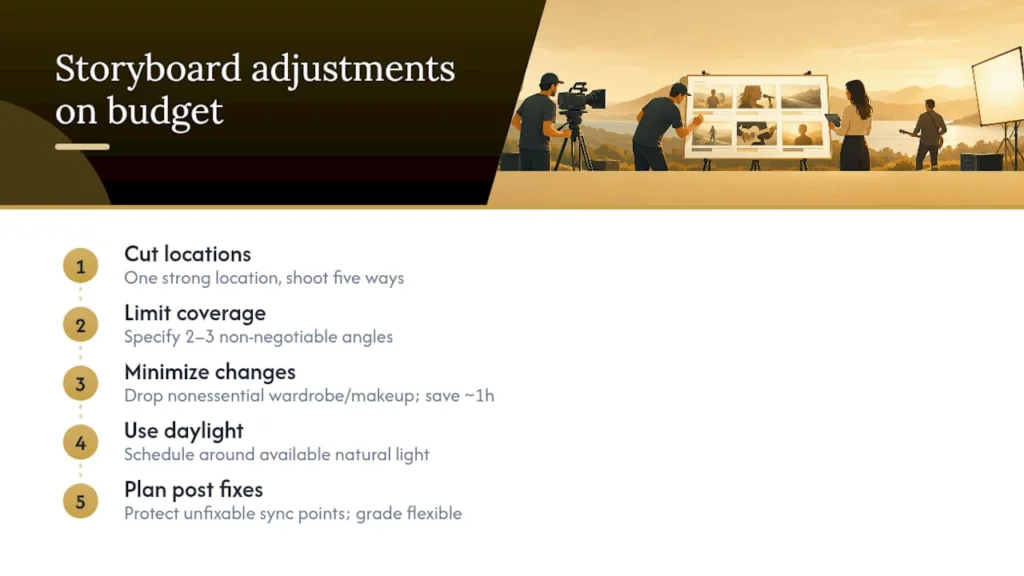
The first adjustment on a tight budget is location count. Every new location adds setup time, travel, and often permit costs. A single strong location shot five different ways, using different lenses, times of day, and blocking, often reads as more visually rich on screen than three mediocre locations rushed through in one day.
The second adjustment is coverage discipline. On a bigger budget, you shoot extra angles because you can. On a tight one, your storyboard needs to specify exactly which two or three angles per section are non-negotiable, because you likely won’t get a second pass. This is where marking must-haves versus nice-to-haves on your shot list earns its keep.
Look changes cost time you may not have. If wardrobe and makeup changes aren’t essential to the story, cutting them from the board entirely can save an hour or more of shoot time that goes straight back into getting more takes of the coverage that actually matters.
Natural light is free, but only if your schedule respects it. A storyboard built around available daylight windows, rather than an arbitrary call time, is one of the most effective ways to raise production value without raising the budget at all.
Finally, plan for what you can fix in post and what you can’t. Color grading can shift a mood significantly after the fact. A missing sync point on a hook cannot be recovered without a reshoot. Budget-constrained storyboards should protect the second category ruthlessly and treat the first as flexible.
What Do Strong Music Video Storyboards Have in Common?
A few recurring patterns show up across effective music video boards, regardless of genre or budget tier.
The strongest boards treat the chorus as the visual anchor of the entire video. Every other section gets designed in relation to it, either building toward it or contrasting against it. Weak boards often treat every section with equal visual weight, which flattens the emotional arc the song is actually trying to create.
Boards built around a hybrid approach tend to use the narrative sections to plant a visual or object that pays off during a performance section, or vice versa. That callback structure, established in the intro or first verse and resolved in the final chorus, is one of the more reliable ways to make a three-minute video feel complete rather than like a loosely connected string of pretty shots.
Effective boards also tend to under-plan dialogue-style narrative beats and over-plan performance coverage, because performance footage is what actually carries most of the runtime once the edit is locked. A board with six angles marked for the final chorus and two loose narrative beats sketched around it usually reflects an editor’s real needs better than the reverse.
The common thread across all of it: the board reflects decisions already made, not decisions deferred to the shoot. Every frame answers a question in advance so the crew spends the day executing, not debating.
When Should You Sketch Fast Versus Finish the Frame?
A rough animatic with reference images is enough for most low-budget or performance-heavy shoots. Full, detailed frames earn their time on high-concept, single-day shoots with complex effects or tight choreography, where miscommunication on set costs hours you don’t have. Either way, lock your sync points first. Everything else can flex.
— DRVVYN Sound
Hire DRVVYN Sound for a Done-for-You Video
Not every artist has the time, crew, or bandwidth to run a full pre-production process, and that’s exactly the gap DRVVYN Sound fills. DRVVYN Sound produces cinematic visual content, handles artist branding, and offers licensing for creators and brands who need a finished, emotionally driven video without managing the storyboard, shot list, and shoot day themselves. If your song needs a visual treatment built around mood, story, and sync accuracy, and you’d rather hand that process to a team that already thinks this way, that’s a hands-off route worth considering over DIY. DIY makes sense when you have the time and crew to run your own breakdown. When you don’t, reach out through the DRVVYN Sound profile to discuss production or licensing for your next release.
Sources
For the track breakdown method and overall workflow, see Storyflow’s storyboard guide. For panel templates and animatic technique, StudioBinder’s guide and its free template downloads cover both. For setup sheets and shoot-day scheduling, Storiara’s script breakdown guide walks through the full process.
- How to Storyboard a Music Video (Storyflow)
- Music Video Script Breakdown: From Treatment to Shoot Plan (Storiara)
FAQ
How Do You Storyboard a Music Video?
Start by breaking the song into timecoded sections, then choose a narrative, performance, or hybrid approach before sketching any frames. From there, generate two to six candidate shots per section, mark sync points with exact timecodes, and convert the finished frames into setup sheets your crew can actually schedule around.
Can ChatGPT Generate Music Video Storyboards?
AI tools can generate rough visual concepts, reference images, and temporary animatic frames to speed up early iteration. Directors typically use these as placeholders for testing pacing and mood, not as final creative decisions, since directorial judgment still drives the actual shot choices.
What Are the Basic Steps of Storyboarding a Music Video?
A workable sequence runs: break down the track into timecoded sections, pick your narrative or performance approach, generate multiple shot options per section, mark sync and lip-sync points, build an animatic to test pacing, then convert the board into setup sheets and a shoot-day order. Some directors add a reference-gathering step before sketching, but the sequence above covers the core method.
What Makes a Music Video Storyline Effective?
Effective storylines usually build around a callback structure, where an object, image, or gesture introduced early resolves by the final chorus, giving the video a sense of closure despite its short runtime. Storylines that treat the chorus as the visual anchor, rather than giving every section equal weight, tend to match the song’s own emotional arc more closely.
Do I Need Professional Software to Build a Storyboard?
No. Free downloadable templates and simple slide-based tools work fine for most drafts, especially for performance-heavy videos where speed matters more than polish. Cloud storyboard apps and dedicated software become more useful once you need to collaborate with a DP or editor in real time, or when the visual concept is complex enough that stick figures stop communicating the shot.