

Creative Process
Cinematic Color Palettes for Filmmakers: 8 Film Examples, Rules, Music
Learn cinematic color palettes with eight film examples, simple 60 30 10 and 3 color rules, palette extraction tips, and how music shapes mood.
By DRVVYN · · 14 min read
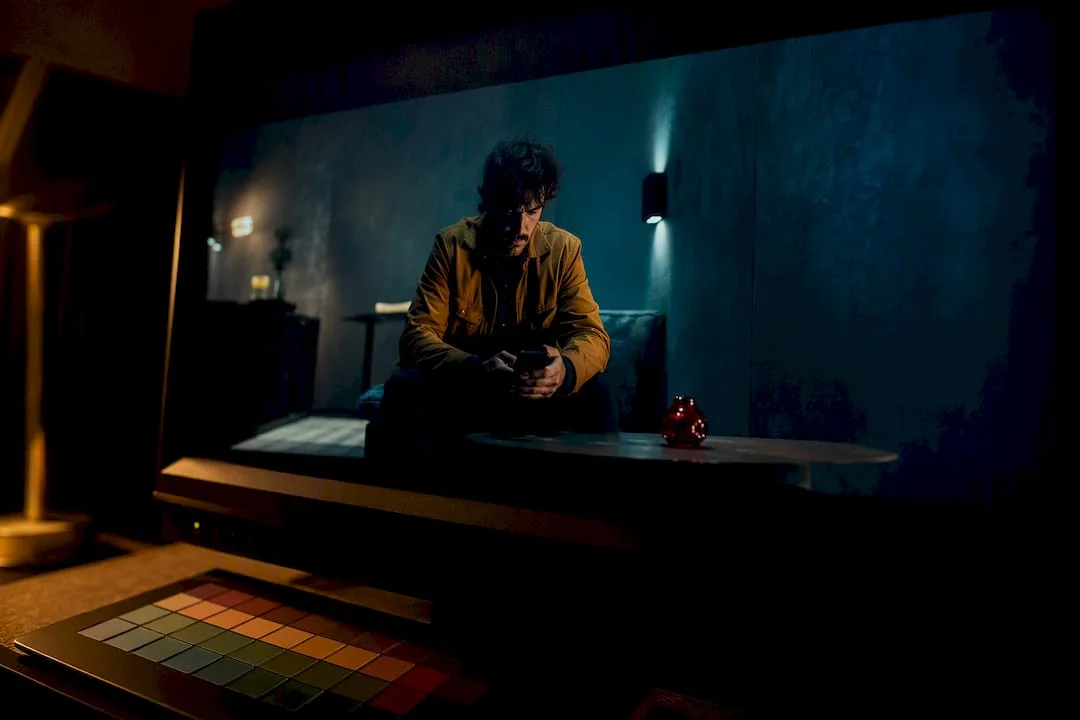
Cinematic color palettes are deliberate color relationships, usually two to four dominant hues plus an accent, that filmmakers use to steer mood and guide the eye before a single line of dialogue lands. They work by managing contrast, emotional temperature, and visual focus across a scene rather than by simply looking pretty. This article breaks down the palette types, walks through real film examples, and hands you the practical rules (60-30-10, the 3-color rule) and workflows you need to build your own.
TL;DR:
- Modern blockbuster grading predominantly uses teal and orange, which effectively makes skin tones stand out against backgrounds and is instantly recognizable.
- Limiting a scene to three colors or applying the 60-30-10 rule helps maintain visual harmony and prevents clutter, especially for low-budget productions.
- Extracting a usable palette requires careful frame selection, discarding shadows, and sampling in perceptually uniform color spaces like CIELAB for accurate matching.
- Consistency in color grading and a well-planned production design are critical, as grading alone cannot create a palette that was not established during filming.
- Emerging trends include more specific complementary pairings beyond orange and teal, plus AI-assisted tools that improve shot matching and palette consistency at a lower cost.
What Are Cinematic Color Palettes, Really?
A cinematic color palette is built from a handful of color-wheel relationships, and each one produces a different emotional signature on screen. StudioBinder’s breakdown of film color traces most movie palettes back to four core relationships: complementary, analogous, triadic, and monochromatic.
Here’s what each one does when it hits the screen:
- Complementary pairs colors from opposite sides of the wheel, like orange and teal, and generates natural visual tension because your eye keeps bouncing between the two.
- Analogous palettes use neighboring hues (blue, teal, green) and read as calm, cohesive, and low-friction.
- Triadic schemes pull three evenly spaced colors and feel more playful or stylized, common in fantasy and animation.
- Monochromatic or duotone palettes strip a scene down to one hue family, which forces focus onto texture, shadow, and performance instead of color contrast.
Underneath all of this sits a simpler mechanic: hue, saturation, and brightness. Hue is the color itself, saturation is its intensity, and brightness is how light or dark it sits. StudioBinder recommends analyzing all three together, because a desaturated blue reads as cold isolation while a saturated blue can feel electric or dreamlike. A high-contrast palette (think stark blacks against a single hot color) signals danger or urgency almost instantly, while a muted, low-contrast palette slows the audience down and invites them to sit with a moment.
Iconic Movie Color Palettes and What They’re Doing
Studying real films is the fastest way to internalize how a palette functions, because you can watch the choice do its job in real time. Below are palette patterns pulled from well-known films, with a note on what each one is actually accomplishing emotionally.
- Teal and orange blockbuster grading. Countless modern action and sci-fi films push shadows toward teal and skin tones toward orange. The pairing works because skin tones naturally sit in the orange spectrum, and teal sits almost directly opposite it on the color wheel, which separates actors from backgrounds and lighting.
- Desaturated blue-gray war and crime dramas. Stripping saturation and pushing everything toward cool gray communicates exhaustion, moral gray zones, and institutional coldness without a single line of dialogue.
- Amber and rust nostalgia pieces. Warm, sepia-leaning palettes signal memory and the past, often paired with softer contrast to feel like a recollection rather than a live event.
- High-saturation primary color fantasy worlds. Triadic red, yellow, and blue combinations show up in stylized fairy-tale and fantasy films to create a heightened, storybook unreality.
- Monochrome black-and-white or single-hue noir. Removing color entirely (or nearly so) forces attention onto shadow shape and facial expression, a technique that survives in modern films chasing a stripped-down, tense atmosphere.
- Sickly green institutional palettes. A green cast over hospitals, offices, or bureaucratic settings reads as clinical, unnatural, or oppressive.
- Pastel, muted palettes in coming-of-age and dramedy films. Soft pinks, dusty blues, and low-contrast pastels create an intimate, slightly wistful tone suited to character-driven stories.
- Cool sterile blue-white sci-fi interiors. Spaceship and lab environments frequently lean into flat, cool lighting to feel controlled, isolating, or futuristic.
Orange and teal has been the dominant blockbuster grade since roughly the 2010s, and it persists because it solves a practical problem: it makes faces pop against nearly any background while adding contrast that reads well even on smaller screens.
The 60-30-10 Rule and the 3-Color Rule, Explained
Two heuristics do most of the heavy lifting once you’ve picked a palette direction: the 60-30-10 rule and the 3-color rule. They overlap but solve slightly different problems.
The 60-30-10 rule allocates roughly 60% of the frame to a dominant color, 30% to a secondary color, and 10% to an accent that pulls the eye. A practical example from No Film School: a scene with teal-lit walls and shadows (60%), a character’s warm amber jacket (30%), and a single red prop on a table (10%) creates instant visual hierarchy without any dialogue explaining where to look.
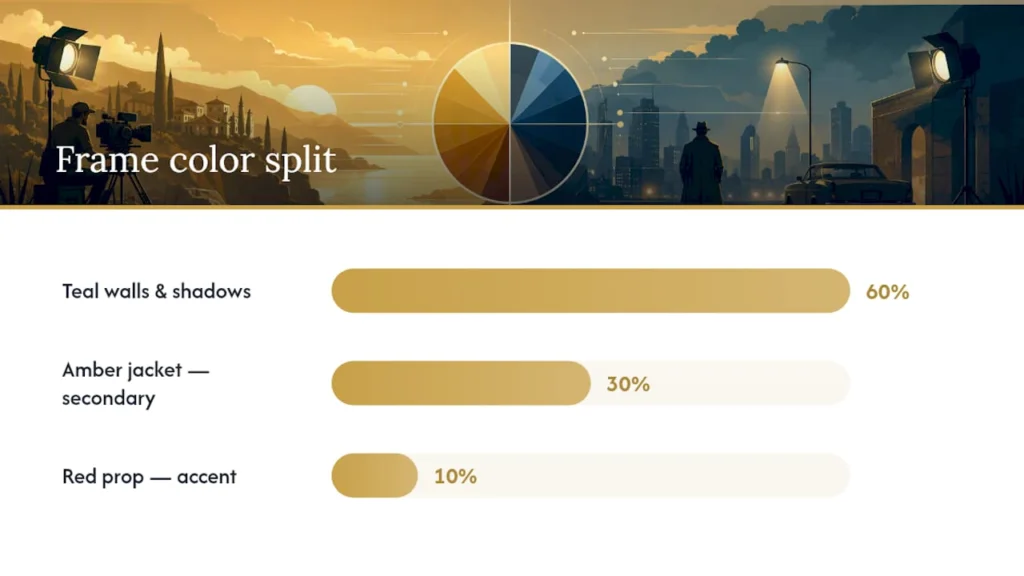
The 3-color rule is simpler and more restrictive: limit the entire frame to three colors total, period. Where 60-30-10 is a proportion guideline, the 3-color rule is a hard cap meant to prevent visual clutter, especially useful for beginner filmmakers working with busy or uncontrolled locations.
A short on-set and grading checklist:
- Lock your dominant and secondary colors in production design and costume before you ever touch a grading tool.
- Check your accent color against skin tones in the actual location light, not just on a monitor in a dark room.
- Grade in small passes across the scene, not the whole film at once, to catch drift early.
- Compare your first and last shot of a sequence side by side to confirm the palette hasn’t quietly shifted.
Pro Tip:Save your grading LUT and node settings as a preset the moment you lock a scene’s look, then apply that same preset as your starting point for every other shot in the sequence. A cinematographer-level best practice is keeping a palette to two or three dominant colors across a full sequence, because inconsistency between cuts is one of the fastest ways to break the illusion you just built.
How to Extract a Palette From Any Frame
Pulling a usable hex palette from a film still or your own footage takes about four steps, and skipping any of them tends to produce muddy, unusable swatches.
- Pick your frame carefully. Choose a shot that represents the scene’s overall look, not an outlier moment with unusual lighting.
- Discard near-black pixels before sampling. Shadows skew averaged color results toward gray, which is why movie-palette generators that ignore near-black areas return swatches that better match what viewers actually remember.
- Sample in a perceptually uniform space like CIELAB, not raw RGB, so the extracted colors match human color perception rather than a mathematical average.
- Export hex codes and test them against skin tones before locking them into a mood board, since a swatch that looks great on a wall can clash badly on an actor’s face.
For tools, the MoviePalette generator is built specifically for pulling palettes from film stills and works well for mood-board research. A basic LUT (lookup table) applied in editing software gets you a fast preview of a target look, but treat LUTs as a starting point, not a finished grade; Adobe notes that even a popular preset like orange-and-teal needs manual adjustment to read as authentic rather than filtered. Use LUTs sparingly and always check the result on real skin tones under your actual lighting conditions.
Choosing the Right Palette for Your Project
Picking a palette works best as a sequence of decisions rather than a single creative leap. Work through it in order and each stage narrows your options in a useful way.
- Pick the emotional intent first. Decide what the scene needs to feel like (tense, intimate, nostalgic, sterile) before you look at a single color swatch.
- Audit your actual environment. Walk the location, check wardrobe options, and inventory available props to find which colors you can pull from real materials rather than inventing them in post. StudioBinder’s approach treats production design and costume as your first color tool, with grading as reinforcement rather than the sole source of the look.
- Apply 60-30-10 and test across multiple scenes. Assign your dominant, secondary, and accent colors, then check the palette holds up in at least two or three different lighting setups before committing.
For low-budget projects, the discipline matters even more. Limit yourself to two or three colors total, lean on costume and props to deliver color rather than expensive lighting rigs, and resist the urge to add a fourth “just because” color once the first three are locked.
| Stage | What to decide | Common mistake |
|---|---|---|
| Emotional intent | The feeling the scene needs to produce | Skipping straight to color choice |
| Environment audit | Dominant color from location, wardrobe, props | Ignoring what’s actually available on set |
| Application and test | 60-30-10 split, checked across scenes | Locking the look on one shot only |
Where Cinematic Color Palettes Came From
Color in film wasn’t always a deliberate storytelling tool. Early color processes like Technicolor were expensive and technically limited, so filmmakers leaned into saturated, theatrical colors partly because subtlety was hard to achieve with the equipment available. That’s part of why classic Technicolor musicals and epics read as bold and heightened rather than naturalistic.
The shift toward palette as a narrative device rather than just a visual novelty accelerated once color film became cheap and reliable enough that directors could take it for granted. By the 1970s, filmmakers started using desaturation and specific color casts deliberately, muting palettes to suggest grit or realism in a way that stood in contrast to earlier, more saturated eras.
Digital intermediate technology in the 2000s changed the game again. Once color grading moved from a chemical, lab-based process to a digital one, filmmakers gained frame-by-frame control they’d never had before. That’s the technical root of the orange-and-teal era: digital grading tools made it trivial to push shadows and highlights in opposite directions across an entire film, and the look spread quickly once a few high-profile blockbusters proved it worked at scale.
Each era’s dominant palette tends to say as much about the available technology as it does about taste. Saturated Technicolor reflected the limits of an early process. Desaturated 1970s realism reflected a cultural turn toward grit. Digital-era teal and orange reflected what became technically easy and commercially proven all at once.
Why Color Choices Change How Audiences Feel a Scene
Color reaches an audience before language does. A palette shift can raise tension, signal a flashback, or quietly tell you a character has changed, all without a line of dialogue confirming it. Filmmakers describe this as building an “emotional room”: a consistent color environment that shapes how the audience feels before they consciously register why.
Warm palettes (amber, red, gold) tend to read as intimate, nostalgic, or dangerous depending on saturation and contrast; a warm, low-contrast glow feels cozy, while a hot, high-contrast red often signals threat. Cool palettes (blue, teal, gray) tend to read as isolating, clinical, or melancholic. Neither reading is universal, but the pattern holds often enough that entire genres lean on it as shorthand.
The psychological pull is strongest when a palette stays consistent long enough to become expected, then breaks. A film that holds a cold, desaturated look for an hour and then bursts into warm saturation for one scene makes that scene feel significant purely through color contrast, independent of what’s happening in the plot. That’s the mechanism behind a lot of “this scene hit different” moments audiences can’t quite explain: the palette did emotional work they never consciously noticed.
This is also why palette consistency matters so much technically. If the “emotional room” flickers between scenes that should feel connected, the audience’s subconscious tracking of mood gets confused, even if they can’t articulate why a film suddenly feels off.
Getting the Look: Grading Tools and Technical Choices
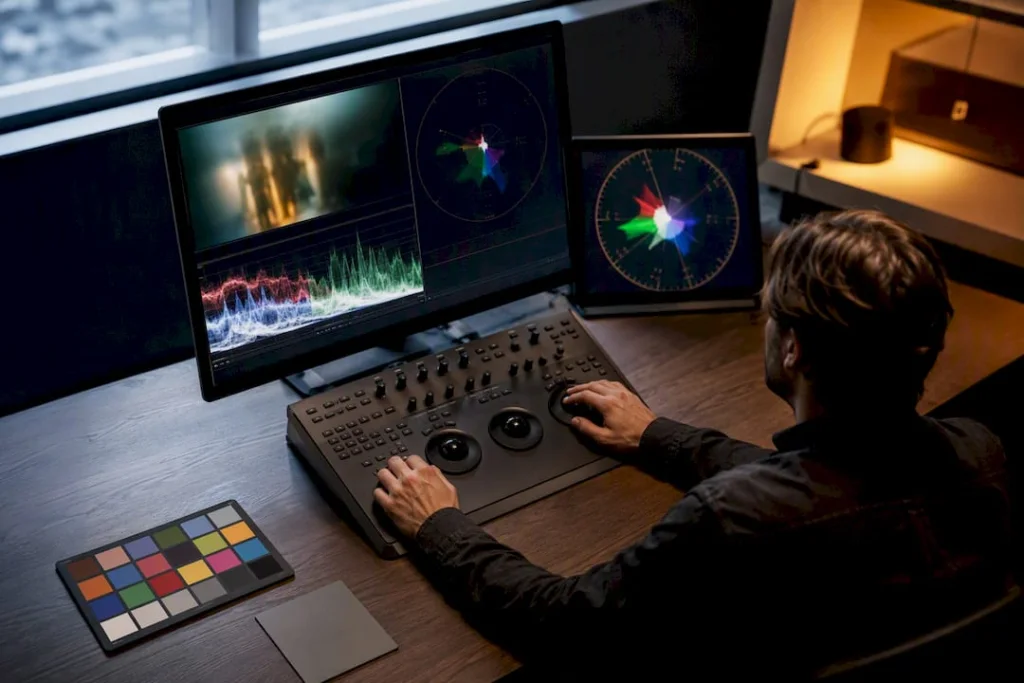
Turning a planned palette into a finished shot happens mostly in color grading, and the technical choices you make there determine whether the palette reads as intentional or accidental. Grading software like DaVinci Resolve, Adobe Premiere Pro, and Final Cut Pro all offer node-based or curve-based color tools that let you isolate shadows, midtones, and highlights separately, which is exactly how looks like orange-and-teal get built: teal pushed into shadows, orange pushed into highlights, creating contrast that makes skin tones pop.
LUTs offer a fast way to preview or approximate a target look, but they apply the same transformation to every pixel regardless of context, which is why a LUT built for one lighting setup can look wrong on footage shot differently. Adobe recommends using a LUT as a starting point and then manually adjusting skin tones, since an unadjusted LUT tends to push faces toward an unnatural orange cast.
Scopes (waveform, vectorscope, parade) matter more than most beginners expect. A vectorscope shows you exactly how saturated your colors are and where they sit on the wheel, which catches problems your eye might miss on an uncalibrated monitor. Grading by eye alone, especially on a laptop screen, is one of the most common ways a palette that looked great in the edit suite falls apart on a properly calibrated display.
Common Mistakes When Building a Cinematic Palette
The most frequent mistake is treating grading as a fix for a palette that was never planned during production. Color grading can push a look further, but it can’t invent a dominant color that isn’t already present in the wardrobe, set, and lighting; trying to force it usually produces muddy, over-processed footage.
A second common problem is palette drift across a sequence, where the color balance shifts slightly from shot to shot because grading happened shot-by-shot without a reference. This is precisely what a consistent, limited palette approach is meant to prevent, and it’s worth catching in editing before it reaches a final grade.
Overcomplicating the palette is another trap, especially for filmmakers excited about color theory. Trying to work in four or five meaningful colors at once usually produces visual noise rather than richness, which is exactly why the 3-color rule exists as a hard limit rather than a suggestion.
Finally, skin tone neglect ruins otherwise solid palettes constantly. A cool or stylized grade that hasn’t been checked against actual skin tones under the intended lighting often turns faces sickly, gray, or unnaturally saturated. Testing on skin tones isn’t optional finishing polish; it’s a check that should happen at every stage of the grade, not just at the end.
What’s Next for Cinematic Color Grading
Streaming has changed how palettes get designed, partly because films now get watched on everything from a calibrated home theater to a phone screen on a bus. That range has pushed some colorists toward slightly higher contrast and more saturated accents than a theatrical-only release might use, simply so the palette still reads clearly on a small, glare-heavy screen.
There’s also a visible pullback from the most extreme orange-and-teal grading in some corners of contemporary film, as audiences and critics have started calling out the look as a cliché rather than a creative choice. That doesn’t mean complementary color grading is going away; it means filmmakers are pushing toward more specific, less generic complementary pairings, like amber-and-slate or magenta-and-green, to get the same contrast benefit without the “every blockbuster looks the same” feeling.
AI-assisted color tools are also starting to change the workflow, offering automated skin-tone protection and shot-matching across a sequence in a fraction of the time manual grading takes. Expect this to lower the technical barrier for smaller productions to achieve consistent, ambitious palettes without a dedicated colorist, while high-end productions continue pushing toward more bespoke, film-specific color identities rather than reaching for an off-the-shelf preset. If you’re designing color for a living room, a designer-focused breakdown of current palette trends shows the same complementary and analogous principles at work outside of film.
DRVVYN Sound’s Perspective: Pairing Palette and Music for Emotional Impact
We think about color and sound as the same decision, not two separate ones. A warm, amber-lit visual palette calls for intimate, textured R&B, close vocals, warm low end, the kind of production that feels like it’s in the room with you. A cool, sterile palette wants space: sparse arrangements, ambient pads, more air between notes. Mismatch the two and even a well-graded scene feels emotionally confused.
When we build a visualizer or cinematic piece for a track, we ask the same question a colorist asks: what’s the emotional room here, and does the music live in it? A quiet, muted palette needs music that doesn’t crowd it. Our approach to color in music visuals and our thinking on why cinematic music sticks with listeners both come back to that same principle: palette and sound should agree before either one gets loud.
— DRVVYN Sound
Sources
For deeper study, these are the resources worth keeping close while you build your own palette library:
- The 60-30-10 color rule | No Film School
- How to Use Color in Film: 50+ Examples of Movie Color Palettes | StudioBinder
- What is the ‘Orange & Teal Look’ and Why is it So Popular? | PetaPixel
- Movie palette generator | MoviePalette
FAQ
What Are Cinematic Colors?
Cinematic colors are the deliberately chosen hues, usually organized around complementary, analogous, triadic, or monochromatic relationships, that filmmakers use to control mood, contrast, and where the audience’s eye goes in a shot.
What Is the 3-Color Rule Used in Filmmaking?
The 3-color rule caps a frame or scene at three total colors to prevent visual clutter, which differs from the 60-30-10 rule by setting a hard limit rather than a proportion.
What Is the 60-30-10 Rule in Filmmaking?
The 60-30-10 rule allocates about 60% of a frame to a dominant color, 30% to a secondary color, and 10% to an accent color that draws the viewer’s attention.
What Are the 12 Color Palettes?
There’s no single standardized “12 color palettes” list in film theory; the core palette types filmmakers actually rely on are complementary, analogous, triadic, and monochromatic, with variations like teal-and-orange, muted pastel, and high-contrast noir built from those four relationships.