
Music Business
One Minute Rule: Find YouTube Shorts Music That Won’t Get Blocked
Find playable YouTube Shorts music, use a creator first safety checklist to avoid Content ID claims, and make tracks remix ready.
By DRVVYN · · 8 min read
Use YouTube’s in-app audio tools, the Shorts audio picker, Creator Music, and the YouTube Audio Library, or a properly licensed track from outside the platform. The single rule that matters most: never publish a Short longer than one minute carrying music with an active Content ID claim, because YouTube can block it globally. Before you upload, preview the sound in the picker and check the pivot page. That habit alone prevents most of the heartbreak.
TL;DR:
- Using audio from YouTube’s Shorts picker and Creator Music minimizes the risk of Content ID claims, but tracks must be explicitly marked as playable and remixable by rights holders.
- Tracks longer than one minute with an active Content ID claim can be blocked globally, requiring proper licensing or removal to avoid content disputes.
- Previewing audio in the picker and checking the pivot page before uploading ensures the selected sound is eligible, saving time and avoiding claims.
- Licensing original tracks or stems designed for Shorts, with metadata aligned for platform recognition, helps foster audience growth and reduces claim issues.
- External royalty-free libraries and AI-generated soundtracks are options, but creators must verify licensing terms to ensure monetization eligibility.
Where Do You Find Playable Music for YouTube Shorts?
The safest path starts inside the app, not on some random forum thread promising “copyright free” beats that turn out to be neither.
The Shorts audio picker is your first stop. It only surfaces sounds YouTube has already cleared for remix use, and each one links to a pivot page showing where the audio came from and how many other Shorts have used it. That transparency matters. If a sound has thousands of other Shorts attached to it, you’re looking at something YouTube has confirmed is playable and remixable.
Creator Music works differently. It’s a licensing catalog inside YouTube Studio where you can preview tracks, then either buy a license outright or opt into revenue sharing with the rights holder. Availability and specific licensing options can vary by region, so check what your account actually offers before building a whole video around one track.
Other reliable sources:
- YouTube Audio Library: fully royalty-free tracks and sound effects, no licensing steps required.
- Dream Track: YouTube’s AI soundtrack generator for Shorts, though creation is not currently available to creators in the EEA. Generated soundtracks are labeled and remixable within Shorts, but you can’t download them for use elsewhere.
- External royalty-free libraries: fine to use if you save the license receipt and confirm the terms cover monetized social video, not just personal projects.
What Triggers a Content ID Claim on Shorts?
Here’s the number that should live in your head every time you tap “publish”: a Short over one minute with an active Content ID claim can be blocked worldwide. Not demonetized. Not limited to one country. Blocked, everywhere, until the claim is resolved.
Shorts fall into a 1 to 3 minute range. Some art tracks are only cleared for up to 90 seconds when accessed through YouTube’s own creation tools. Go past that window with an uncleared track and you’re rolling dice with a system that doesn’t negotiate.
Content ID itself is an automated matching engine. When it recognizes a piece of protected audio in your upload, it hands the rights holder three options: monetize your video, track its performance, or block it outright. YouTube’s rights management documentation confirms this runs largely on autopilot, which is exactly why “I didn’t know” doesn’t hold up as a defense.
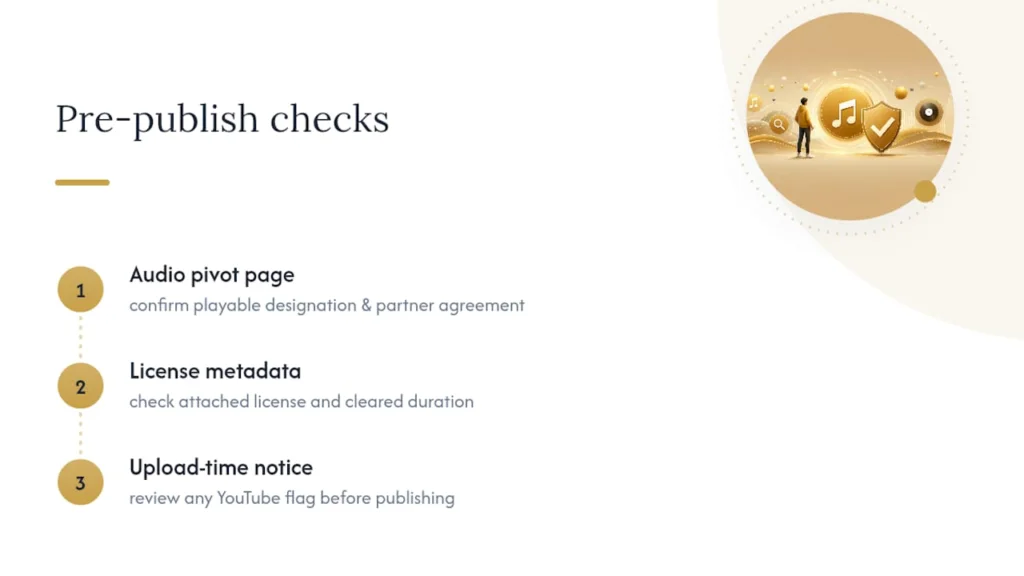
For a track to show up as playable in Shorts at all, its rights holder generally needs an active partner agreement with YouTube, a properly embedded sound recording asset, and a match policy that explicitly allows the “playable” designation. Before you build a Short around a specific song, check three things: the audio pivot page, the license metadata attached to the track, and any upload-time notice YouTube flags before you publish. Skipping that thirty-second check is how most creators end up in claim purgatory.
How Do You Add or Remix Music in Shorts?
The mechanics are simple once you know the sequence. Getting the sequence wrong is how good ideas end up buried under a claim.
- Open the YouTube app and tap Create, then Short.
- Tap Add sound and search or browse the picker. Eligible tracks display their allowed duration right there, so you’re not guessing.
- To remix existing content, use Green Screen, Cut, or Use this sound. Cut segments typically run 1 to 5 seconds, while full audio use can extend up to 90 seconds depending on the original partner’s agreement.
- To generate an AI soundtrack, open Dream Track from the Shorts creation menu. The result is labeled, remixable by other creators inside Shorts, but not downloadable for outside use.
- If a claim lands anyway, you have three moves: remove the clip, pursue a proper license for the track, or file a dispute, but only with documentation proving you had rights to use it.
Pro Tip:Screenshot the audio pivot page before you publish. If a claim shows up later, that screenshot is your proof the track was marked eligible at the time you used it.
What Makes Shorts Music Actually Work for Viewers?
Eligibility keeps you safe. Selection is what keeps people watching.
Before anything else, confirm “Use this sound” is active and skim the pivot page metadata. That’s non-negotiable groundwork. From there, creative choices take over: lead with your strongest hook in the first second, cut your visuals to the beat instead of against it, and lean toward instrumentals or stems when you can, since vocal-heavy tracks carry a higher claim rate.
Monetization works differently depending on the tool. Creator Music’s revenue-sharing terms are built around long-form video economics, and they don’t translate one-to-one to Shorts revenue, so pick tracks with that distinction in mind rather than assuming every licensed song pays the same way across formats.
| Priority | What to check | Why it matters |
|---|---|---|
| Eligibility | “Use this sound” active, pivot page reviewed | Prevents global blocking |
| Hook | First second of audio and visual | Determines scroll-past rate |
| Format | Stems or instrumental where possible | Fewer vocal-based claims |
| Discoverability | Save sound, tag original artist | Builds remix chains and views |
Saving a sound and linking back to the original artist’s page also helps other creators find and remix it, which is exactly how a track snowballs into a trend.
Getting Your Own Tracks Shorts-Ready
Rights holders who want their music circulating on Shorts need to do some homework upfront, not scramble after a claim dispute. That starts with pairing an art track to a correctly embedded sound recording asset inside a rights management system, so YouTube’s Content ID API can recognize and mark it playable for remix use. Skip that step, and the track can end up unavailable in certain regions for no reason a creator would ever guess.
Some independent music and multimedia companies handle production, music publishing, and visual content built with platform recognition in mind from the start.
If you’re a creator looking to license a track directly from an independent artist, come prepared:
- A short description of your Short’s concept and runtime.
- Your publish deadline.
- Whether you need a one-time needle drop license or an ongoing usage arrangement.
Artists who release stems and short, shareable hooks, and who opt into Shorts remix programs, tend to see faster audience growth and far fewer claim headaches than those who leave their catalog locked down.
Why Cleared Audio Is the Real Growth Lever
Shorts can push a song in front of more listeners in a week than months of standard promotion, but that reach turns into friction fast when the audio underneath isn’t cleared. We’ve watched the difference play out in how a release is prepared: short stems built specifically for remix use, metadata that opts into Shorts discovery instead of blocking it, and a promotional plan that treats every remix as free marketing rather than a threat.
The mistake most independent artists make is choosing lockdown over access. Openness, done deliberately, builds bigger audiences. Chase the trend, but never at the cost of the legal groundwork underneath it.
— DRVVYN Sound
Need Cleared Tracks or Shorts-Ready Edits?
Some companies offer original music releases built with stems, short edits, and metadata friendly to Shorts from the ground up, providing an alternative to hunting through royalty-free libraries. Some providers produce visualizers and cinematic content that pair naturally with a Shorts push, giving clips a visual identity instead of a static thumbnail.
If you need a license for a specific track, or want original music built around your content calendar, start with a short brief: what the Short needs, your deadline, and how you plan to use the audio. From there, DRVVYN Sound’s music project management guide walks through how commissioning and licensing work from request to delivery.
FAQ
Can You Have Music in YouTube Shorts?
Yes. You can add music through the Shorts audio picker, license tracks via Creator Music, pull royalty-free audio from the YouTube Audio Library, or generate an AI soundtrack with Dream Track where available.
What Songs Are Commonly Used in YouTube Shorts?
There’s no single fixed list since eligible sounds rotate constantly, but the safest bet is always checking the Shorts audio picker, which only surfaces tracks YouTube has confirmed as playable and remixable.
Where Can I Get Music for YouTube Shorts?
Start with YouTube’s own tools, the audio picker, Creator Music, and the Audio Library, since they’re pre-cleared. For original, licensed tracks, working with an independent artist or label through a needle drop license gives you a documented right to use.
Why Did My Shorts Music Get Blocked?
Shorts longer than one minute with an active Content ID claim can be blocked worldwide. Removing the clip, licensing the track properly, or disputing with documentation are your three options once a claim lands.
Is Dream Track Available Everywhere?
No. Dream Track creation is currently unavailable to creators in the EEA, though generated soundtracks that already exist can still be remixed by creators in Shorts.