

Creative Process
-14 LUFS to -1 dBTP: Mastering for Streaming With Encode Checks
Mastering for streaming with a practical workflow: set LUFS and true peak targets, render and test AAC and Opus exports, and follow a 7 point DRVVYN Sound…
By DRVVYN · · 19 min read
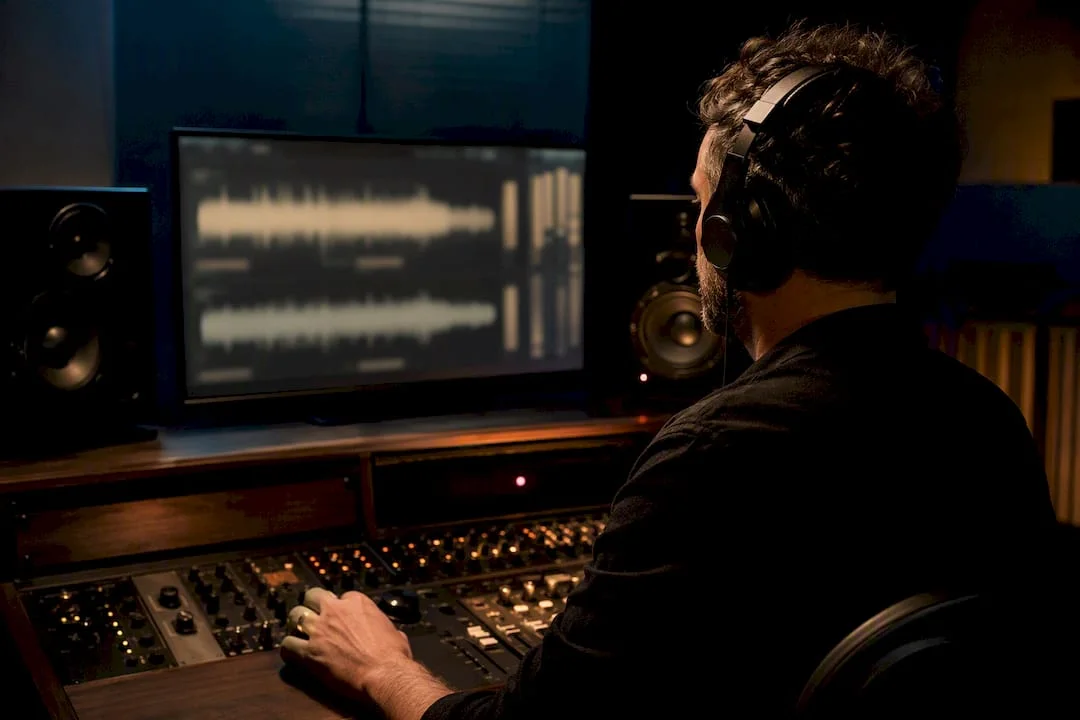
Aim for a balanced master, then measure it. Keep integrated LUFS wherever the song calls for it emotionally, but hold true peak at or below -1 dBTP, and drop to -2 dBTP if you push louder than -14 LUFS. Before you call it finished, render the file, encode it the way a listener will actually hear it, and audition that encoded copy. One well-built master, checked this way, is almost always enough.
TL;DR:
- Most streaming platforms use non-destructive normalization based on true peak and LUFS, meaning louder masters are turned down rather than re-limited.
- Spotify targets -14 LUFS integrated loudness with true peak at -1 dBTP, while Apple Music and YouTube rely on inference and playback checks rather than fixed targets.
- Encoded lossy files, especially AAC and Opus, can reveal true-peak overshoots not visible in the DAW, requiring re-rendering with true-peak limiting at -1 or -2 dBTP.
- Achieving consistent loudness across an album involves balancing relative dynamics and referencing tracks, not just hitting a single LUFS value on each song.
- Proper metadata entry, including ISRC codes and accurate artist info, is crucial for discoverability and correct attribution on streaming platforms.
What LUFS, True Peak, and Normalization Actually Mean
Loudness on a streaming platform is not the same thing as loudness in your session. Your limiter’s output meter tells you almost nothing about how a listener will experience the track once Spotify or Apple Music gets ahold of it. That gap is why LUFS and true peak exist as separate, standardized measurements, and why understanding them changes how you approach the final stage of a mix.
Integrated LUFS (Loudness Units Full Scale) measures the overall perceived loudness of an entire track from start to finish, weighted to match how human hearing responds to different frequencies. It is not a peak measurement. It is closer to an average, but a psychoacoustically informed one. Short-term LU looks at loudness over a rolling window, usually three seconds, which is useful for catching sections that spike or dip relative to the rest of the song. True peak (dBTP) estimates the actual peak level of the analog waveform after digital-to-analog conversion, including inter-sample peaks that a standard digital peak meter cannot see.
All three of these measurements trace back to one document: ITU-R BS.1770, the international standard that defines how loudness and true peak are calculated. Every LUFS meter worth trusting, from the free ones bundled in your DAW to paid analyzers, implements this same math. That consistency matters. If two engineers measure the same file on two different meters built to BS.1770, they should land on nearly identical numbers.
Here is the part that surprises a lot of producers: normalization on most streaming platforms is not destructive. The service is not re-limiting your file or baking in a new master. Instead, it applies a playback gain offset in real time. If your track measures louder than the platform’s target, playback volume gets turned down. If it measures quieter, it may get turned up, depending on the platform and setting. Your original file, dynamics intact, remains what actually gets played back. That single fact should reshape how aggressively you limit a mix.
A few things worth keeping straight as you work:
- LUFS measures perceived loudness across the whole track, not peak level.
- True peak accounts for reconstruction peaks that occur during digital-to-analog conversion, which standard sample peak meters miss entirely.
- Normalization generally adjusts playback volume rather than altering the delivered file.
- BS.1770 is the shared technical foundation behind every credible LUFS and dBTP meter.
Why does true peak get its own separate rule instead of folding into LUFS? Because lossy codecs like AAC and Opus reconstruct the waveform during decoding, and if your true peak sits too close to 0 dBTP, that reconstruction can overshoot digital full scale. The result is a specific kind of distortion, often described as inter-sample clipping, that shows up only after encoding, not in your original WAV. A master that looks perfectly clean in your DAW can develop audible clipping the moment it becomes an MP3, AAC, or Opus stream. This is exactly why true peak for streaming deserves its own line item in your mastering checklist, separate from loudness entirely.
How Do Spotify, Apple Music, and YouTube Handle Loudness?
Spotify is the most transparent of the major platforms about its numbers, and its published guidance is worth memorizing rather than approximating. The default “Normal” setting targets -14 LUFS integrated, with true peak recommended at -1 dBTP for masters around that target, tightening to -2 dBTP if you intentionally master louder than -14 LUFS. Spotify also offers “Loud” and “Quiet” listener-selectable modes, but Normal is what nearly everyone hears by default.
Pro Tip:Roughly 87 percent of Spotify listeners never touch the default normalization setting. Mastering around Normal covers the overwhelming majority of your actual audience, not a theoretical edge case.
Apple Music operates differently and, frankly, more opaquely. It uses Sound Check, a proprietary normalization system, but Apple has not published a single universal LUFS target the way Spotify has. Engineers who have measured widely accepted commercial masters across genres generally see Sound Check behaving in a similar range to Spotify’s Normal target, but there is no official document to cite chapter and verse. Treat Apple Music guidance as directionally similar to Spotify’s, not identical, and verify by ear when a release matters.
YouTube publishes encoding and format specifications, including preferred codecs and sample rates for its transcoding pipeline, but it does not enforce a single published LUFS requirement the way Spotify does. YouTube’s own loudness normalization exists and is broadly comparable to other platforms, though its documentation focuses more heavily on video and audio codec compliance than on a specific integrated loudness number.
A few practical implications follow from this patchwork:
- Spotify gives you an exact number to design around: -14 LUFS Normal, -1 dBTP or -2 dBTP true peak.
- Apple Music and YouTube require inference and listening checks rather than a documented single target.
- Desktop web players, car integrations, and third-party hardware sometimes apply normalization differently than the mobile app, which is why final listening checks on multiple devices still matter even after you have hit your numeric targets.
- No platform, published target or not, replaces the need to audition your actual encoded deliverable.
This is also where platform playback behavior intersects with discoverability. A track that plays back inconsistently against its neighbors in a playlist, because its loudness or peak handling differs wildly from the norm, creates a rougher listening experience exactly at the moment a new listener is deciding whether to stick around.
Building a Streaming-Ready Master Step by Step
The workflow below assumes you are working from a finished mix and moving into the mastering stage. It is not a formula that produces one “correct” loudness for every song. It is a repeatable process for hitting a defensible target and, critically, proving that your export survives the trip through a lossy codec.
1. Set up your meters correctly
Load a BS.1770-compliant LUFS meter and configure it to show integrated LUFS, short-term LU, and true peak simultaneously. Most modern metering plugins, including free options and paid suites, implement this standard correctly, but confirm the meter is reading true peak (oversampled) rather than sample peak. Sample peak meters miss inter-sample overshoots entirely, which defeats the purpose of checking true peak in the first place.
2. Decide your integrated LUFS target with intention, not superstition
Do not force every track to exactly -14 LUFS. Spotify’s published number is a reference for what happens at playback, not a mandatory mastering ceiling. Because normalization adjusts gain non-destructively, a track mastered at -9 LUFS and a track mastered at -14 LUFS will both get turned down or left alone to approximately match Normal’s target on Spotify. What differs is how much limiting you had to apply to reach -9 LUFS in the first place, and that limiting is permanent, audible, and irreversible once baked in. This is the real argument for a moderate, dynamics-conscious loudness rather than a race to the loudest possible integrated number.
3. Set your true-peak ceiling based on how loud you’re mastering
If your integrated loudness sits near or below -14 LUFS, target true peak at or below -1 dBTP. If you are intentionally mastering louder than -14 LUFS, tighten that ceiling to -2 dBTP. Some engineers prefer an even more conservative -3 dBTP as extra insurance against certain codec behavior, particularly on material with dense high-frequency content that stresses lossy encoders more than typical program material.
4. Configure your limiter for true-peak awareness, not sample-peak awareness
Most modern limiters include a true-peak or oversampling mode. Turn it on. A limiter set to catch only sample peaks will let inter-sample overshoots slip through even while showing you a clean, compliant meter. Watch for pumping and breathing artifacts, especially on low-end-heavy material; if you are riding the limiter hard enough to hear it working, back off input gain rather than pushing the limiter further into its ceiling. Preserving transients, especially on percussive or vocal-forward tracks, usually matters more to perceived quality than squeezing out another decibel of loudness.
5. Export a proper deliverable set
Your archival master should be a lossless file, typically WAV or AIFF, at your session’s native sample rate and at 24-bit depth. Name files clearly and consistently, something like artistname_tracktitle_master_v2_24bit.wav, so nothing gets confused six months later when a licensing request comes in. Keep this lossless file as your permanent archive regardless of what any individual platform requests.
6. Encode and re-measure before you call it done
This is the step most producers skip, and it is the one that catches real problems. Render representative lossy versions, AAC and Opus at minimum, since those are what most listeners actually stream. Run your LUFS and true-peak meter on those encoded files, not just your original WAV. If the encoded version shows clipping or a true-peak overshoot your original didn’t have, that is the codec’s reconstruction revealing a problem your session meters could never show you. This single habit, verifying the actual encoded audio rather than trusting the source file, separates a genuinely finished master from one that only looks finished.
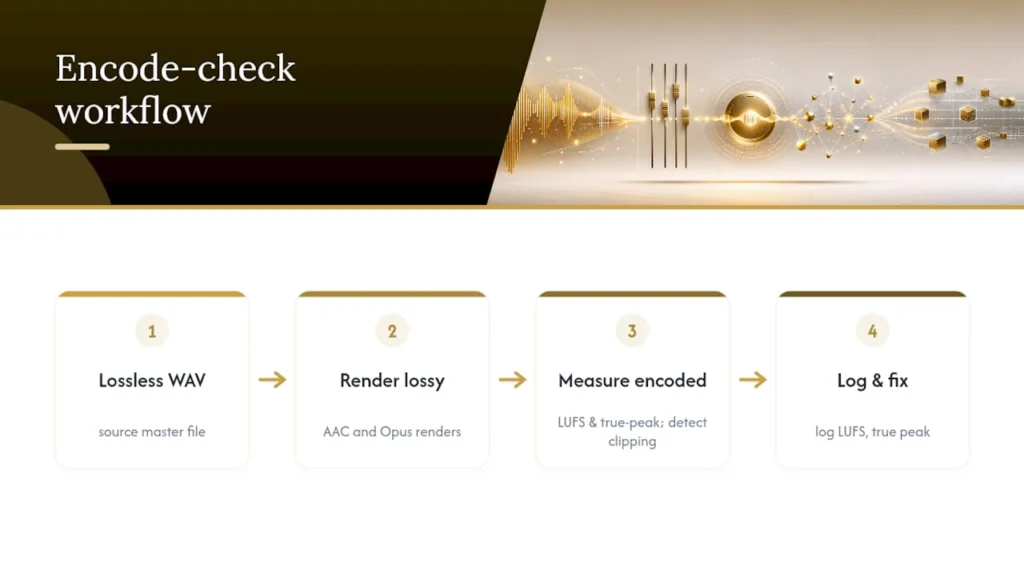
Pro Tip:Keep a simple log for each release, listing integrated LUFS, true peak, and which encoded formats you checked. Six months later, when a sync licensing request or a remaster comes up, you will thank yourself for not having to reconstruct that information from memory.
Sequencing and Loudness Across a Full Album
Streaming platforms that support album-level playback generally apply normalization relative to the album as a whole rather than resetting gain independently for each track, when the listener plays straight through. That distinction changes how you should think about consistency. Chasing an identical LUFS number on every song is less useful than making sure the relationships between tracks feel intentional.
A quiet interlude that measures -20 LUFS next to a chorus-heavy single at -11 LUFS is not a mistake if that contrast is the point. What matters is whether the transition between them feels like a deliberate creative decision or an accident of inconsistent gain staging. Preserving that kind of dynamic contrast across a tracklist is part of what makes an album read as a cohesive body of work rather than a loose collection of singles.
Practical guidance for album sequencing:
- Reference tracks against each other during mastering, not just against an external streaming target.
- Use short-term LU readings to check whether verses, choruses, and transitions maintain sensible relative loudness within each song before worrying about the album average.
- Rely on a single, well-balanced master for most albums; only build a separate louder single master when a specific track is being pushed for radio, sync pitching, or a format with different loudness norms.
- Document the sequence order and relative loudness choices so a mix engineer or mastering collaborator understands the intent later.
Most albums do not need two competing masters. They need one master built with the whole tracklist in mind from the start.
Fixing the Most Common Streaming Mastering Mistakes
Over-limiting is the single most common problem in masters built for streaming, and it is usually self-inflicted by chasing loudness that normalization was going to erase anyway. The symptoms are recognizable: a flattened, fatiguing top end, kick drums and vocals losing punch, and a general sense that the track sounds “loud” but not powerful. If a mix sounded exciting before mastering and lifeless after, the limiter is almost always the culprit, not the arrangement.
Inter-sample clipping is quieter and easier to miss. It often sounds like a faint, gritty edge on transients, sometimes described as a subtle crunch on snare hits or sibilance that wasn’t present in the original mix. You will not always catch it by eye on a sample-peak meter. The fix is straightforward, though: re-render with your limiter in true-peak mode, drop your ceiling to -1 dBTP or -2 dBTP depending on your integrated loudness, and re-check the encoded file, not just the WAV.
Run this checklist any time a master feels off after encoding:
- Re-render the file with the limiter’s true-peak mode engaged.
- Measure both integrated LUFS and true peak on the freshly rendered file.
- Encode to AAC or Opus and listen critically, ideally on headphones and a phone speaker.
- If distortion persists, reduce limiter ceiling further and check gain staging earlier in the chain rather than fighting it at the final limiter stage alone.
Pro Tip:If you are hearing a problem only after encoding and not in your DAW, resist the urge to add more limiting to “fix” it. Adding limiting to cure a true-peak overshoot usually makes the underlying inter-sample issue worse, not better.
Mastering Checklist for Streaming Releases
Every release that leaves our sessions goes through the same sequence, regardless of genre or intended platform. Consistency in process is what keeps quality predictable, even when the creative goals of a given track differ wildly from the last one.
- Confirm mix readiness. No mastering decision fixes a mix problem; balance, low-end control, and vocal clarity should already be settled.
- Set target measurements before touching the limiter. Decide integrated LUFS range and true-peak ceiling (-1 dBTP standard, -2 dBTP if mastering louder than -14 LUFS) based on the song’s emotional intent, not a fixed rule.
- Engage true-peak limiting and watch for pumping or transient loss during the loudest sections.
- Export the lossless archive at full session resolution, named consistently for future retrieval.
- Encode representative lossy files (AAC, Opus) and remeasure LUFS and true peak on those files specifically.
- Audition on at least three playback contexts: studio monitors, headphones, and a phone speaker, since that third one exposes problems the other two hide.
- Log final numbers and archive alongside the project’s delivery documentation for future reference.
Naming conventions matter more than most producers admit until they are searching for a file at 11 p.m. before a deadline. Keep archival lossless masters separate from any louder promotional variants, and label both clearly enough that nobody downstream mixes them up.
Recommended Sample Rate and Bit Depth for Streaming Masters
Deliver your archival master at 24-bit depth, and keep your sample rate matched to whatever you tracked and mixed at, whether that is 44.1kHz or 48kHz. Streaming platforms transcode incoming files to their own delivery formats regardless of what you submit, so there is no loudness or quality advantage to upsampling a 44.1kHz session to 96kHz before delivery. Doing so adds file size without adding real fidelity, since you cannot recover detail that was never captured at the original sample rate.
Sixteen-bit delivery, a holdover from CD-era specifications, is unnecessary today. Twenty-four-bit gives you meaningfully more headroom during the mastering process itself, particularly useful when applying gain changes or subtle EQ moves late in the chain. For a deeper technical comparison of how these two specs actually affect your signal chain, it’s worth understanding the difference between resolution and frequency range before assuming higher numbers automatically mean better sound.
The one place sample rate genuinely matters is upstream, during tracking and mixing, where higher rates can affect plugin behavior and alias artifacts in synthesis or heavy processing. By the time you reach mastering for streaming, the priority shifts entirely to bit depth for headroom and to making sure your final export matches your session rate rather than introducing an unnecessary conversion step.
What Dynamic Range Compression Should and Shouldn’t Do
Compression at the mastering stage exists to glue elements together and add perceived density, not to eliminate the difference between a song’s quiet and loud moments. The two goals get confused constantly, and the confusion is what produces the flattened, joyless masters that dominate loudness-war-era criticism.
Dynamic range, the gap between a track’s quietest and loudest moments, is part of what makes a chorus feel like a release and a verse feel like a setup. Compress that gap away entirely, and you remove the mechanism that creates emotional lift in the first place. A snare hit that sits at the same relative level as the vocal underneath it stops reading as an accent and starts reading as noise.
Because streaming normalization turns loud masters down rather than rewarding them with extra visibility, there is no algorithmic upside to crushing dynamic range in pursuit of loudness. The platform behavior itself removes the traditional loudness-war incentive; what is left is a purely creative decision about how much punch and breathing room a given song needs. Preserve enough dynamic range that the arrangement’s dramatic moments still land, and use compression to shape tone and cohesion rather than to inflate a meter reading that gets adjusted at playback anyway.
Why Metadata Shapes What Listeners Actually Hear and Find
Metadata is not cosmetic. Incomplete or inconsistent ISRC codes, track titles, artist names, and album art references can cause a release to display incorrectly, fail to link properly across a discography, or get miscategorized by a platform’s recommendation systems. A perfectly mastered track with broken metadata still underperforms, because the listener never reliably finds it in the first place.
Consistency across every distributed file matters as much as accuracy. Artist name spelling, featured-artist credits, and genre tagging need to match exactly across every track in a release, since mismatches confuse both platform algorithms and human listeners scanning a discography page. Discoverability depends heavily on this administrative layer functioning correctly behind the scenes, well before a listener ever presses play.
ISRC codes in particular deserve attention, since they are the mechanism platforms and royalty collection systems use to track plays and attribute revenue correctly. A missing or duplicated ISRC can mean streams get miscounted or misattributed entirely, an invisible problem until royalty statements come back wrong months later. Treat metadata entry with the same care as your final export checklist, not as an afterthought handled by whoever uploads the release.
Making Masters Hold Up on Phones and Weak Connections
Most streaming listening happens on phone speakers, earbuds, and compressed mobile connections, not on studio monitors. A master that impresses on a treated room’s monitors can fall apart on a phone speaker if it leans too heavily on sub-bass or extreme high-frequency detail that small drivers simply cannot reproduce.
Check your mid-range balance specifically, since that is the frequency territory a phone speaker actually handles well. If a vocal or lead instrument gets buried the moment you switch from monitors to a phone speaker, that is a mix and master problem worth solving before final export, not something to blame on the listener’s hardware. Low-bandwidth streaming, particularly on Opus at lower bitrates, compresses stereo width and transient detail somewhat; extremely wide stereo effects or razor-sharp transients that depend on full bandwidth to read clearly can lose impact after encoding.
The fix connects directly back to the encode-check step covered earlier: audition your representative AAC and Opus renders on an actual phone speaker, not just headphones. If something feels thin or buried at that stage, address it in the master rather than assuming the platform or the listener’s device is at fault. A mobile-first listening check takes five minutes and catches problems no amount of studio monitoring will reveal.
Loudness as a Creative Choice, Not Just a Compliance Target
Numbers give you a floor to stand on, not a ceiling on what a song is allowed to feel like. There are tracks where a slightly hotter master genuinely serves the emotional intent, a bridge that needs to hit harder than the numbers suggest, a song built around aggression or intensity where restraint reads as timidity instead of taste. When that is the honest creative call, we make it, and we protect it by tightening the true-peak ceiling to -2 dBTP rather than by pretending -14 LUFS is a moral requirement.
What we will not do is let a fear of streaming normalization talk an artist out of the loudness a song actually needs, or let chasing loudness talk an artist into flattening a moment that depends on dynamic space to land. Every final check, session meters, encoded-file measurement, phone-speaker audition, exists to protect the gap between what a song is supposed to feel like and what actually reaches a listener’s ears. Get that gap small enough, and the LUFS number becomes a footnote instead of the whole story.
— DRVVYN Sound
Get Your Next Release Mastered and Streaming-Ready
Most independent producers either fight loudness targets alone with a plugin preset, or hand a track to a mastering service that returns one loud, one-size-fits-all file with no encode verification. Some mastering services include a session-to-encode verification process, measuring integrated LUFS and true peak on the rendered lossy files, not just the studio WAV, so what you deliver to Spotify or Apple Music matches what you confirmed sounds right. That means fewer surprises after release day and a lossless archive you keep. If you want to hear that process applied to a finished release rather than read about it, stream Music for Quiet Moments and listen for how dynamics and loudness sit together across the tracklist. If you’re preparing your own release for delivery, reach out to start a conversation about mastering and delivery prep for your next single or album.
Where to Verify These Numbers Yourself
Do not take mastering guidance, including this article, purely on faith. Spotify’s own loudness normalization documentation lays out the -14 LUFS Normal target and true-peak recommendations directly from the source. ITU-R BS.1770 is the underlying measurement standard every credible LUFS meter implements, worth reading if you want to understand exactly how the math works rather than just trusting your plugin’s readout. For a deeper technical walk-through of true-peak ceilings and why -1 versus -2 dBTP matters for codec behavior, the true peak mastering guide from Velveteen.fm covers the reasoning in more depth than a single article can.
Sources
- Loudness normalization on Spotify – Spotify
- ITU-R BS.1770-5 (loudness measurement standard) – ITU
- How loud should I master tracks intended for streaming? – Sound On Sound
FAQ
What Levels Should I Master to for Streaming?
There is no single mandatory number, but a defensible starting point is integrated loudness that serves the song creatively, with true peak at or below -1 dBTP, tightening to -2 dBTP if you master louder than -14 LUFS. Spotify’s published Normal target sits at -14 LUFS, but normalization means going louder doesn’t gain volume, it just gets turned down at playback.
Is LUFS OK for Streaming?
Yes, LUFS is the correct and standardized measurement for streaming loudness, based on the ITU-R BS.1770 standard that every major platform’s normalization system relies on. Measuring integrated LUFS alongside true peak, rather than relying on an old-fashioned peak meter alone, is the accurate way to prepare a master for streaming.
Do I Need a Separate Louder Master for Streaming?
Usually not. Because normalization adjusts playback gain rather than rewarding louder files, one well-balanced master typically works across Spotify, Apple Music, and YouTube; a separate louder version only makes sense for specific uses like radio or sync pitching.
How Do I Check if My Master Will Clip After Encoding?
Render your master to AAC and Opus, then run a true-peak meter on those encoded files directly rather than trusting your original WAV’s readings. If the encoded version shows overshoots your source file didn’t have, lower your true-peak ceiling and re-export.
Does Metadata Affect How My Music Sounds on Streaming Platforms?
Metadata doesn’t change audio quality, but inconsistent artist names, missing ISRC codes, or mismatched credits can cause a release to display incorrectly or get miscategorized, hurting discoverability even when the master itself is technically excellent.